
Send a short survey invitation with IllyVoIP SMS and collect answers in a hosted web form. This guide uses Google Forms as the example form service. The message contains a respondent link; it does not ask people to reply by SMS or assume an incoming-message capability.
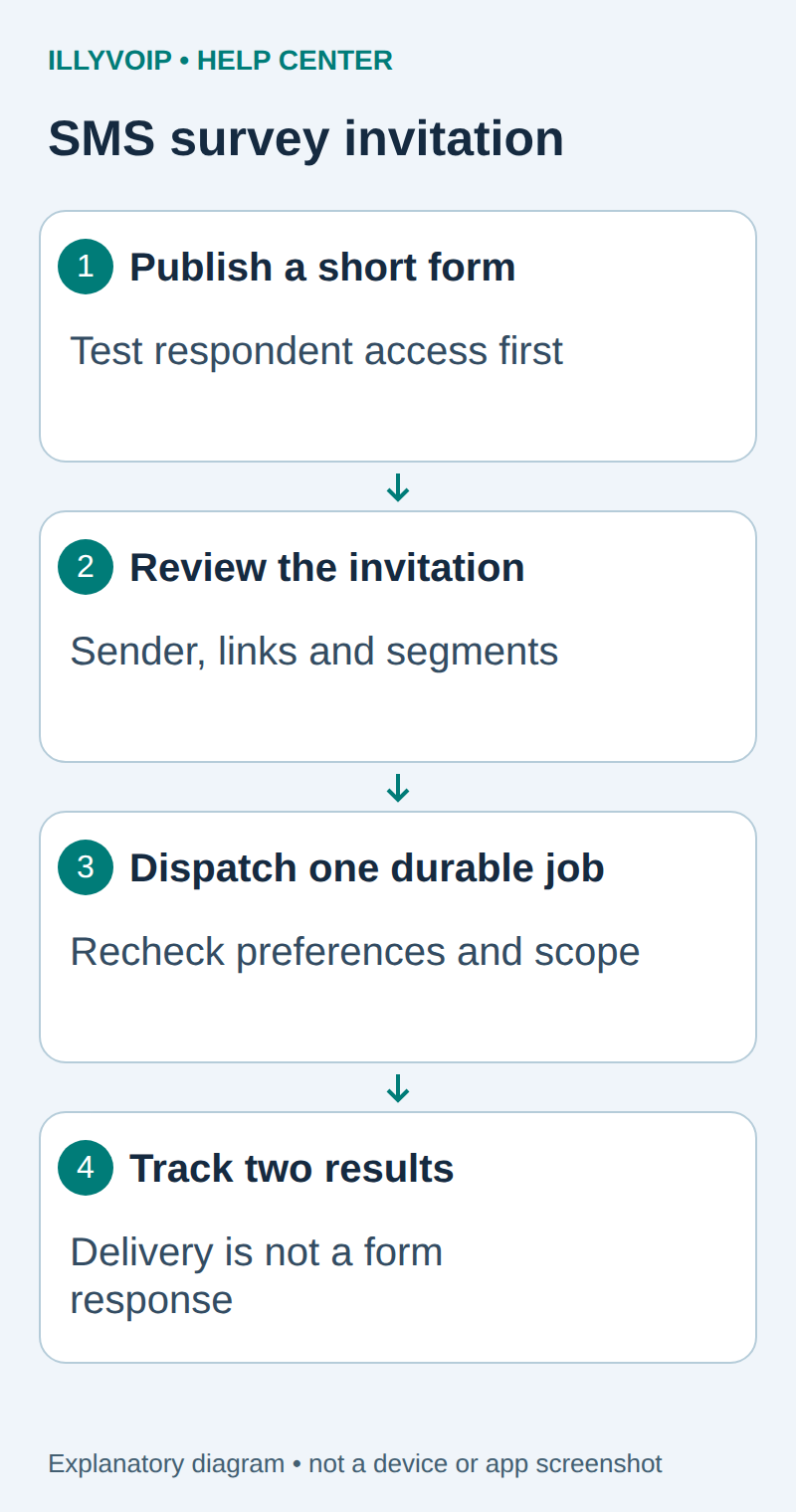
1. Define the survey and audience
Choose one clear purpose, such as feedback after a completed support interaction. Decide who is eligible, how long the form stays open and who may read the answers. Use your organization’s authorized contact list and existing communication preferences.
Keep the questions short and avoid requesting payment details or unrelated personal information. A survey invitation is separate from a service alert, so check that the recipient’s permission and your sending purpose match. Do not automatically invite every historical contact just because their number exists in the Portal.
2. Publish and test the respondent form
- Create the form in the authorized Google account and add only the necessary questions.
- Review Settings, including email collection and response limits.
- Publish the form and configure who may respond.
- Copy the respondent link, not the editor URL.
- Open the link as an intended respondent and submit a clearly labelled test response.
Google documents that limiting a form to one response requires respondents to sign in to a Google account. That can be unsuitable for some customer audiences. Choose deliberately and test access from outside your administrator session.
Keep response summaries private unless sharing them is intended. An anonymous form cannot reliably attribute each answer to an SMS recipient. Do not add a phone number, email or account reference to the query string just to manufacture that connection.
3. Prepare the invitation
Use a recognizable allowed sender, explain the purpose and identify the business. For example:
Example Support: How was your recent support experience?
Please share feedback here: YOUR_RESPONDENT_LINK
Preferences: YOUR_APPROVED_PREFERENCE_LINK
Replace the placeholders with the reviewed HTTPS links before sending. Check the completed message’s encoding, segments and destination price. A long link or Unicode text can increase the number of billable segments. Avoid unfamiliar public link shorteners that hide the destination.
A preferences link must lead to a working preference workflow that your application actually respects. The related opt-out guide explains an application-owned suppression list; adding the word “STOP” alone does not implement inbound reply handling.
4. Create one durable invitation job
You need an IllyVoIP account permitted to use the relevant API, sufficient balance for paid operations and an API key. In the Portal, open Account settings → Developer tools and follow its verification prompts. Keep the key in your server’s secret configuration as ILLYVOIP_API_KEY, outside source control and shared documents. Read-only catalog and reporting requests are different from paid speech generation or SMS submission.
Use the durable SMS outbox pattern in the website-form guide or an existing equivalent. Give each invitation a unique business identity based on recipient, survey version and eligible interaction. Save the destination, sender, approved message, idempotency key and processing state before dispatch.
Immediately before sending, recheck the recipient’s preference, whether the invitation is still relevant and whether the form is still open. Suppress an already accepted or uncertain invitation rather than creating another key. A changed message belongs to a reviewed new decision, not an automatic retry.
Submit through the existing POST /api/v1/sms/messages operation with X-Api-Key and the stored Idempotency-Key. Use the documented from, to and message fields. The survey itself is not an additional IllyVoIP API field.
5. Track delivery and answers separately
Save the accepted message reference and follow the normal delivery-report workflow. Accepted, delivered, opened and completed are different states; the SMS delivery result does not prove that the form was opened or answered.
Review form responses in the authorized form account. With anonymous responses, report aggregate results without guessing who supplied a particular answer. If individual attribution is necessary, design that explicitly in your own authenticated application and explain it to respondents.
Do not resend after an uncertain API response without reconciling the original submission. Do not remind everyone whose response cannot be matched when the form was deliberately anonymous.
6. Close the survey cleanly
Stop new invitation jobs when the survey closes. Keep the destination page informative so late readers understand that collection has ended. Preserve only the data needed for your stated purpose, and apply the retention policy to exports as well as the form.
| Item | Meaning or action |
|---|---|
| Recipients cannot open the form | Check responder access, sign-in requirements and whether the link is the published respondent link. |
| Messages cost more than expected | Review the final text, links, encoding and segments before the next dispatch. |
| Duplicate invitations | Inspect the durable business key and uncertain-attempt handling. |
| SMS delivered but no response | Delivery is not form completion; do not mark the integration broken on that evidence alone. |
Related guides and reference
Google Forms respondent sharing. IllyVoIP API reference. Reviewed October 12, 2026. Examples are instructional: local checks do not establish a completed paid request, live third-party integration or production PBX acceptance.