
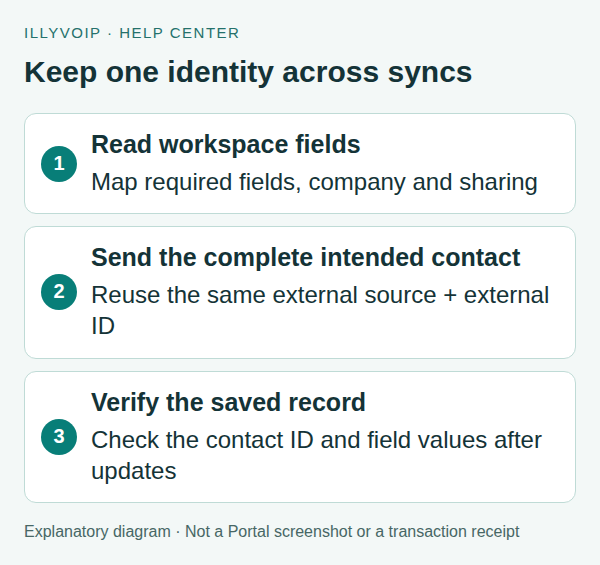
Use the Contacts API to synchronize your own CRM with IllyVoIP. Read the workspace configuration first, then send contact data with a stable external_source and external_id. Keep those references unchanged for later updates so the same CRM record continues to identify the same contact.
This guide is for a custom backend integration. If you use the Portal’s native HubSpot connection or a CSV import, follow that workflow rather than running two independent sync methods over the same contacts without a plan.
1. Plan which system owns each field
The examples use a terminal with cURL and a server-side API key supplied through the ILLYVOIP_API_KEY environment variable. Keep the key out of browser code, screenshots and source control. Follow the API quickstart to reveal your key using the Portal’s verification prompts. Examples are templates, not records of a completed transaction; replace placeholders deliberately before running them.
Decide whether the CRM or IllyVoIP is authoritative for names, telephone numbers, email, company, sharing and custom fields. Export or retain a private pre-change copy before an initial sync. Start with one deliberately chosen test contact, not your complete customer list.
Do not treat an upsert as an arbitrary partial patch. Omitted fields can be replaced by defaults or empty values; company, sharing, phone, email and custom-field data need deliberate handling. Read the current contact and construct the complete intended update. Do not send only a new email address and assume every other property will remain untouched.
2. Read the workspace schema
curl --silent --show-error --fail-with-body \
  'https://api.illyvoip.com/api/v1/contacts/workspace' \
  -H "X-Api-Key: ${ILLYVOIP_API_KEY:?Set ILLYVOIP_API_KEY}" \
  > contacts-workspace.json
Inspect the available company, sharing, status and custom-field information. Use identifiers that belong to this account. Required extra fields must be supplied, and custom-field keys must match existing field IDs or slugs. The crm_id and source names in reference examples are examples, not fields guaranteed to exist in every workspace.
| Field type | Value format |
|---|---|
| Number | Dot decimal, without grouping separators. |
| Date | YYYY-MM-DD. |
| URL | An http:// or https:// URL. |
| Required extra field | A valid value for the actual configured field. |
3. Choose a durable external identity
For example, use external_source: my_crm and the CRM’s persistent record ID as external_id. Do not use an email address or name if it may change, and do not generate a new random external ID on each run.
The API also accepts an existing contact id or uuid for direct updates. Use a clear, consistent identity strategy. Keep the returned IllyVoIP contact identity in your integration’s mapping table. Legacy contacts can have no UUID; a stable returned numeric ID remains useful.
4. Prepare one complete intended contact
The following is a minimal new-contact template. Its name and email are fictional. Save it as contact-request.json, choose your own stable external reference, and add every custom field required by your workspace before sending:
{
  "external_source": "my_crm",
  "external_id": "tutorial-contact-001",
  "name": "Example Contact",
  "email": "contact@example.test",
  "custom_fields": {}
}
This template does not assign a company or shared users and is not a safe blanket update for an existing contact. For a real sync, include the intended phone, existing account company_id, shared_user_ids, applicable call_status and complete custom-field values. Do not copy company or user IDs from someone else’s sample.
5. Save and inspect the response
curl --silent --show-error --fail-with-body \
  'https://api.illyvoip.com/api/v1/contacts' \
  -H "X-Api-Key: ${ILLYVOIP_API_KEY:?Set ILLYVOIP_API_KEY}" \
  -H 'Content-Type: application/json' \
  --data-binary @contact-request.json > contact-response.json
This request creates or updates real account data. Check the HTTP result and JSON status. On success, store the returned contact.id, available UUID and external reference, then compare the returned fields with the intended values.
Open Contact Center → Contacts to inspect the same contact. Confirm company and sharing as well as its name and telephone number. Sharing a contact is a separate decision from giving someone account-wide Portal permissions.
6. Verify later updates and incremental reading
Change one deliberate field in your source, build the complete intended payload again, and reuse the same external source/ID pair. Confirm the saved contact ID remains the same. If a response is uncertain, look up the contact before deciding to create another one.
To read contacts, use GET /api/v1/contacts. It supports q, updated_since, include_deleted, page and limit. This endpoint uses page pagination, not the call-history cursor. Read the returned pagination and finish the relevant pages before advancing your own sync checkpoint.
curl --silent --show-error --fail-with-body --get \
  'https://api.illyvoip.com/api/v1/contacts' \
  -H "X-Api-Key: ${ILLYVOIP_API_KEY:?Set ILLYVOIP_API_KEY}" \
  --data-urlencode 'page=1' \
  --data-urlencode 'limit=100' > contacts-page.json
A search is a discovery aid, not a unique-match guarantee. Match the returned identity/external reference before updating. Decide explicitly how your integration treats deletion; do not delete IllyVoIP contacts simply because they were absent from one filtered or incomplete page.
7. Resolve validation and identity conflicts
- HTTP 422 for custom fields: check missing required fields, unknown keys and value formats. The invalid contact is not saved; do not assume valid fields were partly applied.
- Company not found: refresh the account’s company catalog rather than inventing an ID.
- Invalid phone: correct the complete international number explicitly.
- Identity conflict: reconcile the existing external mapping instead of changing the external ID to force a duplicate.
- Unexpected cleared values: compare the complete submitted payload and your field-ownership policy; do not assume omitted fields were preserved.
Frequently asked questions
Is a stable external reference enough to prevent every sync mistake?
No. It identifies the record for an idempotent upsert, but your integration must still send the correct fields and avoid competing writers.
Can I create new custom fields just by sending new keys?
No. Use configured workspace fields. Unknown fields are rejected rather than silently creating a new schema.
Should I run this alongside native HubSpot sync?
Only with a clear ownership and conflict-handling plan. Otherwise, use the integration intended for that workflow.
Related guides and reference
For current endpoint parameters and examples, use the IllyVoIP developer resources and public API specification.
Instructions reviewed on 8 October 2026. Available controls and service options depend on your account. Use the current values shown in your Portal.
Resume an interrupted contact sync
Keep the last fully completed synchronization time in durable storage. Do not replace it with the current time when a job starts: a failure halfway through the result would then skip contacts you never saved. This read workflow complements the upsert instructions above; it does not change which system owns each field.
- Record a run-start timestamp in UTC and retain the previous successful checkpoint. Query from a slightly earlier timestamp to overlap the last run; choose that overlap for your job frequency and expected delays.
- Request
include_deleted=trueand keep the sameupdated_since, search scope and limit while reading every page. Inspectpagination.total_pages; save the contact rows before progressing. - Upsert each returned record into your local mirror using its IllyVoIP ID or UUID. Keep your external identity mapping separately. Repeated rows update the same local contact instead of creating another one.
- When a row has
deleted_at, mark that known contact deleted locally. Do not mistake its remaining name or phone fields for an active contact. Preserve the mapping if your own retention policy permits it. - Advance the durable checkpoint only after all pages were successfully applied. Save the run-start time, rather than the later finishing time, so edits made during the run can be revisited.
Understand the pagination limitation
The Contacts API uses page numbers and sorts by modification time, newest first, then ID. It is not a frozen snapshot or a change-event stream. An edit while you are paging can move a row between pages. An overlapping next run and idempotent upserts reduce this risk, but do not guarantee that arbitrary concurrent edits can never be missed. Schedule periodic full reconciliation; if strict completeness is essential, arrange a quiet synchronization window or discuss your requirements with Support.
An absent contact is not a deletion signal. It might be outside your search filter, on an unread page or moved by another edit. Use the returned deletion marker, not absence from one response. Do not reset your entire CRM from a partial result.
Check crash recovery with a small example
Suppose page 1 contains an updated contact and page 2 contains a deleted contact. Apply page 1, then simulate a failure before page 2. The checkpoint must remain unchanged. On restart, the updated contact is safely applied again, the deleted contact is marked deleted, and only the completed run advances the checkpoint. Repeat this test after changing your local storage or scheduler.
Keep counts for rows read, contacts updated, deletion markers applied and failed pages. These help diagnose a stopped job without logging customer names, phone numbers or your API key.
Related guides
Reviewed 12 October 2026 against the current IllyVoIP controls, implementation and applicable references. Available options depend on account permissions and service state.