
Use IllyVoIP to send a short reminder for an unpaid invoice in your own billing system. The billing system remains the source of truth for due dates, amounts and payment state. This is not a reminder for topping up an IllyVoIP account, and IllyVoIP does not collect the invoice payment.
1. Define which invoice qualifies
The SMS API sends when your worker calls it. Scheduling, business-event checks and suppression belong to your application; this guide does not add undocumented scheduling fields to IllyVoIP.
You need an IllyVoIP account permitted to use the relevant API, sufficient balance for paid operations and an API key. In the Portal, open Account settings → Developer tools and follow its verification prompts. Keep the key in your server’s secret configuration as ILLYVOIP_API_KEY, outside source control and shared documents. Read-only catalog and reporting requests are different from paid speech generation or SMS submission.
This workflow can use Stripe Invoicing or an equivalent system with an authenticated invoice read API. Start with a fixed policy, such as one approved reminder for a finalized, open invoice after its due date. Exclude draft, paid, void and otherwise ineligible records. Do not infer an unpaid balance from the absence of a webhook alone.
Choose an authorized customer phone number and a short message that identifies your business. Avoid account credentials or payment-card details. Link only to the reviewed invoice/payment page on the expected provider or business domain.
2. Record the event without sending from the webhook
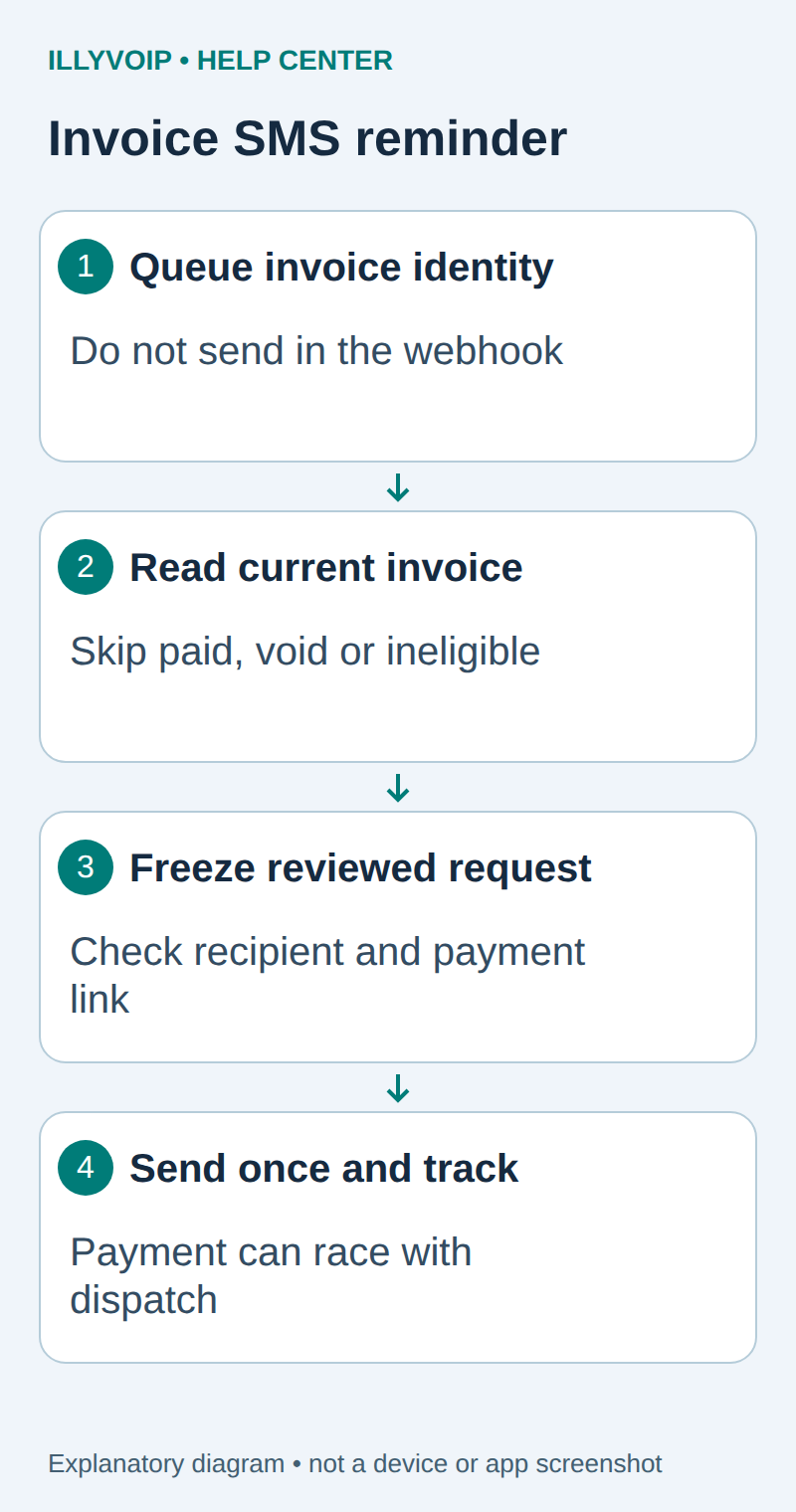
If invoice events create candidate jobs, verify their signatures and deduplicate event IDs first. Queue the invoice reference rather than sending immediately inside the webhook handler. A background worker can then fetch current state and perform the final eligibility check.
Use a stable business identity such as invoice ID plus reminder stage. Event IDs alone are insufficient: different invoice events can refer to the same reminder opportunity. Maintain a unique database constraint on the business identity.
3. Read the invoice immediately before dispatch
- Claim the due reminder record atomically.
- Fetch the invoice through the billing provider’s authenticated read API.
- Confirm the account/customer, finalized/open status, due date and positive remaining balance.
- Check current notification preferences and recipient suppression.
- Freeze the invoice revision/reference, allowed recipient and exact message.
If the read fails, defer. Do not send using an old cache merely because a reminder job exists. For Stripe, review the documented invoice lifecycle rather than mapping every non-paid status to “overdue.” Pending payment and other collection states may need a business-specific exclusion.
4. Use a narrow message and a trusted link
| Item | Meaning or action |
|---|---|
| Business name | Make the sender’s identity recognizable. |
| Invoice reference | Use a customer-facing reference, not a private database key. |
| Link | Use the expected provider/business hostname and the authenticated invoice record’s value; never copy a link from an untrusted webhook field without checking it. |
| Amount | If included, format the current currency and minor-unit amount correctly. |
| Contact path | Give the customer a way to resolve a discrepancy without sending sensitive information by SMS. |
Review the final segment count and destination price. Do not use a public URL shortener that obscures the payment destination. Store only the payment link needed for this message and restrict access to the job record.
Submit through the existing SMS worker
Use the durable outbox from the authenticated website-form SMS guide or your existing equivalent. Store a unique business-event identity, normalized recipient, allowed sender, reviewed text and stable idempotency key before dispatch. The HTTP request uses this shape:
POST https://api.illyvoip.com/api/v1/sms/messages
X-Api-Key: YOUR_SERVER_SIDE_KEY
Idempotency-Key: THE_STORED_KEY_FOR_THIS_MESSAGE
Content-Type: application/json

{"from":"YOUR_ALLOWED_SENDER",
 "to":["AUTHORIZED_INTERNATIONAL_NUMBER"],
 "message":"THE_FROZEN_REVIEWED_TEXT"}
These placeholders are not working credentials or a destination to test. Your application performs the business checks before this immediate request. Use an atomic claim so two workers cannot send the same job. Persist an attempting/uncertain state before network I/O, then save accepted IDs and rejected recipients. Do not treat HTTP success as delivery; follow the status endpoint or a verified delivery webhook.
Preserve the exact input, local job identity and response before moving to the next step. A timeout or lost response is an uncertain outcome, not permission to submit the same paid operation again under a new name. Recover from a saved successful response when possible; otherwise reconcile the original attempt. API duplicate-charge protection does not replace your application’s operation history.
5. Handle payments and uncertainty after the check
A customer can pay between your last read and SMS acceptance. You cannot eliminate that race by assuming the queue owns the invoice. Keep the check timestamp and request record; make the message polite and easy to disregard if payment was just made.
When a payment or void event arrives, cancel unsent jobs. An accepted SMS cannot be recalled by deleting your local record. Do not automatically send a correction or start another reminder stage after an uncertain attempt.
Test the complete decision
Test open/overdue, future-due, paid, void, draft, zero-balance and provider-read-error cases. Also test a payment arriving after the candidate was queued, duplicate invoice events and concurrent workers. The paid and unreadable cases must never reach the send function.
This guide covers one notification workflow. It does not establish a debt-collection policy, a legal compliance guarantee or permission to contact any number you possess.
Related guides and reference
Stripe invoice lifecycle. IllyVoIP API reference. Reviewed October 11, 2026. Examples are instructional: local checks do not establish a completed paid request, live third-party integration or production PBX acceptance.