
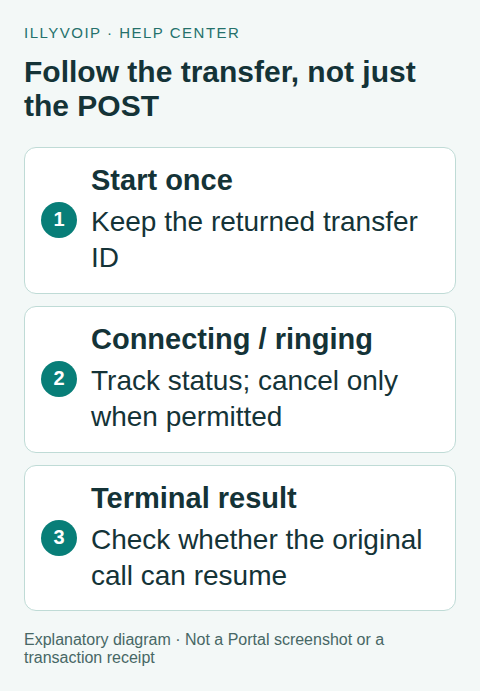
To transfer an active Voice API call, submit the intended destination once, keep the returned transfer_id and follow the transfer-status endpoint. The initial response can be connecting or ringing; neither means the destination has answered.
This guide is for developers who already have an active call_control_id. You need API access, an authorized target and a clear policy for no answer. External transfers can incur calling charges. The workflow does not claim a consultative or warm transfer feature.
1. Check the original call and target
Read /api/v1/voice/call-control/status with the control ID. Do not transfer a terminal session or start competing actions from multiple workers. Your application should allow one worker to own the transfer decision for this call.
Select the target from a server-side allowlist. Use type pstn with an intended external phone number, or sip_user with a SIP identity permitted under the account. An arbitrary SIP URI is not the same as the documented SIP-user target. Verify destination readiness separately from the original caller’s connection.
2. Start the transfer once
POST to https://api.illyvoip.com/api/v1/voice/call-control/transfer using X-Api-Key and JSON:
{
  "call_control_id": "YOUR_ACTIVE_CALL_CONTROL_ID",
  "target": {
    "type": "pstn",
    "value": "AUTHORIZED_INTERNATIONAL_DESTINATION"
  }
}
Persist transfer_id with the control ID and target. Inspect transfer.state, message and can_cancel. Do not treat the response as a synchronous transfer completion, and do not send the transfer request repeatedly as a form of polling.
This article does not assume that adding an Idempotency-Key gives the transfer endpoint the same replay contract as call creation or billable speech. Keep an application-level operation record. If you lose the initial response, reconcile the existing call/operation rather than blindly starting a second transfer.
3. Poll the transfer reference
POST the following body to /api/v1/voice/call-control/transfer-status:
{"transfer_id":"YOUR_RETURNED_TRANSFER_ID"}Use a delay and a bounded overall deadline appropriate to your service and account rate limits. Read the full transfer object rather than relying only on the outer success status.
| State or flag | Meaning for your application |
|---|---|
| Connecting or ringing | The attempt is in progress. Continue tracking; do not claim the target answered. |
| Completed | The transfer reports completion. Stop the old menu’s actions. |
| Failed or canceled | Inspect the message and original-session recovery flags. |
| Terminal | The transfer attempt has ended; this alone does not say whether the original caller is still connected. |
| Can cancel | The current response permits an attempt to cancel, subject to a state change before the request arrives. |
4. Cancel only while cancellation is available
If your application’s no-answer deadline is reached and the current response permits cancellation, POST the transfer-ID body to /api/v1/voice/call-control/transfer-cancel. Then read the result and status again.
There is a race between your last status check and cancellation. The destination may answer in that interval. Handle a cancellation refusal as a state change to reconcile, not proof that the system malfunctioned. Do not promise the customer that clicking Cancel can undo an already completed connection.
5. Recover according to both states
After a failed or canceled transfer, inspect resume_original and request the original call status. Only continue a fallback when the system reports the original session can resume and it is still active. If the caller has disconnected, close the application record without playing another prompt or making a replacement call.
A suitable fallback can explain that the chosen department is unavailable and offer one alternative from your allowlist. Bound the number of alternatives. If no branch is available, deliberately end the active session through hangup. Do not recursively transfer between two unavailable destinations.
6. Save evidence that explains the outcome
Keep the control ID, transfer ID, target type, state transitions and safe returned message. The status response provides started, completed, failed and canceled timestamps where available. Distinguish target no answer, caller hangup, rejected destination and your application’s own cancellation.
For Support, provide these references and the relevant time/timezone. Never include the API key. A UI timeout or a missing local log is not enough to diagnose a carrier failure.
Frequently asked questions
Can I announce the caller privately to an agent first?
This guide covers the documented tracked transfer. It does not establish a separate consultation leg, agent whisper or warm-transfer workflow.
Does terminal mean the original call ended?
Not by itself. It describes the transfer attempt. Read the original call status and recovery flags before deciding what to do next.
Related guides and official references
Reviewed on 8 October 2026 against the current IllyVoIP implementation and available official documentation. Examples use placeholders and are not evidence of a completed live transaction. Check your account’s current availability and prices before executing paid requests.