
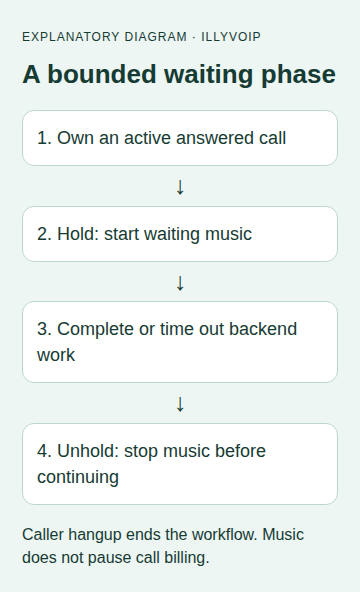
Use POST /api/v1/voice/call-control/hold to start waiting music on an owned Voice API call and POST /api/v1/voice/call-control/unhold to stop it. Both use the call’s call_control_id. The current behavior starts/stops music; it does not establish call parking, private consultation, bridge muting or a billing pause.
This guide follows the current API contract and implementation checked October 9, 2026. It is for a backend that already creates or answers calls through Voice API Control. The examples were checked locally against the contract; no live call or audible music test was performed.
1. Keep the right control identity
Obtain call_control_id from the successful Create or Answer workflow and store it against the application’s call record. Do not substitute a telephone number, CDR ID, webhook-event ID or browser SDK call object.
For incoming calls, first follow Route and answer an incoming Voice API call. For an outbound flow, use the outbound notification guide. Starting a call and knowing that the far end has answered are different stages.
Before starting music, check the current owned call state using your established call lifecycle and the documented control/status workflow. Stop processing a call that has ended. Use the same server-held API key authority as the call-control workflow; never expose it to a browser.
2. Plan the waiting interval
A useful example is a short wait while your backend retrieves a customer record. Decide the maximum wait before it begins, what you will say if the lookup fails, and what happens if the caller hangs up. A backend timeout should not leave an unattended call indefinitely playing music.
Serialize media actions for each call. Finish or stop an existing prompt as appropriate before introducing waiting music, and stop waiting music before starting the next prompt or transfer. Do not issue conflicting media commands concurrently and assume their completion order matches the order in your source code.
3. Start waiting music
Send this JSON body to /api/v1/voice/call-control/hold on api.illyvoip.com using X-Api-Key and Content-Type: application/json. Replace the illustrative ID with the exact stored control ID of your active owned call.
{
  "call_control_id": "vapi_REPLACE_WITH_OWNED_CALL_ID"
}
Use a server-side HTTP client with an explicit timeout and no cross-origin redirect following. Keep a record that the hold command is in progress before transmitting it. The public request schema used here accepts the control ID; do not copy internal music-class names, file paths or a guessed music URL into the payload.
A successful response includes status, the same call_control_id and a nullable music_class. A null music_class can occur for the default selection; it is not by itself an error.
{
  "status": "success",
  "call_control_id": "vapi_REPLACE_WITH_OWNED_CALL_ID",
  "music_class": null
}
Check HTTP status and the parsed response. A command-success response is not proof that a human heard music. Include an actual audio check in your authorized acceptance test.
4. Stop music before continuing the conversation
When the bounded backend work completes, send the same JSON body to /api/v1/voice/call-control/unhold on api.illyvoip.com. A successful response includes status: success and the matching control ID.
{
  "status": "success",
  "call_control_id": "vapi_REPLACE_WITH_OWNED_CALL_ID"
}
- Check that the call has not ended.
- Request unhold and confirm its response or reconcile an uncertain result.
- Only then issue the intended next prompt or transfer using the call’s current state.
- Clear the application’s waiting state and cancel any remaining wait timer.
Stopping music does not itself transfer the caller, resume a paused application task or hang up the call. Those are separate decisions. If the application task failed, play the appropriate failure message or follow the planned fallback rather than silently continuing with incomplete data.
5. Handle errors and caller hangup
- Caller ends the call: cancel backend work where possible, mark the call ended and stop issuing media commands. Do not create a replacement call merely to finish a wait.
- Hold response is lost: music may already have started. Keep the uncertainty in the call record and reconcile before retrying or continuing.
- Unhold response is lost: do not assume music stopped. Inspect the current call lifecycle and resolve the action through the documented control workflow.
- Backend lookup times out: enter the planned failure path; stop music if the owned call remains active, and escalate an unresolved stop result.
- Authentication, ownership or not-found error: verify the key’s authority and exact call ID. Do not try another customer’s ID or fabricate a new one.
- Conflicting action or temporary failure: pause the per-call action queue, check current state and follow the documented response. A generic unbounded retry loop is unsafe.
A cleanup/finally block can request unhold when your application exits a waiting section, but it cannot guarantee the state of a remote call after a network failure. Persist unresolved actions so another worker can reconcile them. Do not send a late cleanup command after another worker has deliberately advanced the call to a different media step.
6. Verify the sequence before real use
In local tests, record the request order and validate that both bodies contain the same control ID. Exercise successful hold/work/unhold, work failure, caller hangup, a late response, a lost response and an expired waiting deadline. Confirm that your application never loops forever or starts a new outbound call as recovery.
Then make a deliberate authorized test call: confirm waiting music is audible, stops before the next prompt and does not interfere with two-way conversation afterward. Check remote hangup during the wait. These live checks are separate from the local contract checks used to prepare this guide, and normal charges apply throughout the call.
Common questions
Does hold pause charging?
No billing pause is established by this action. Treat the call as ongoing and subject to its normal charging rules.
Can I use it as a private consultation feature?
Not based on these endpoints alone. Starting music is not proof that another call leg is muted or isolated.
Where do I configure a custom music file?
This guide does not expose a custom-music configuration. Use the supported default behavior and confirm any additional capability through the current product documentation or Support.