
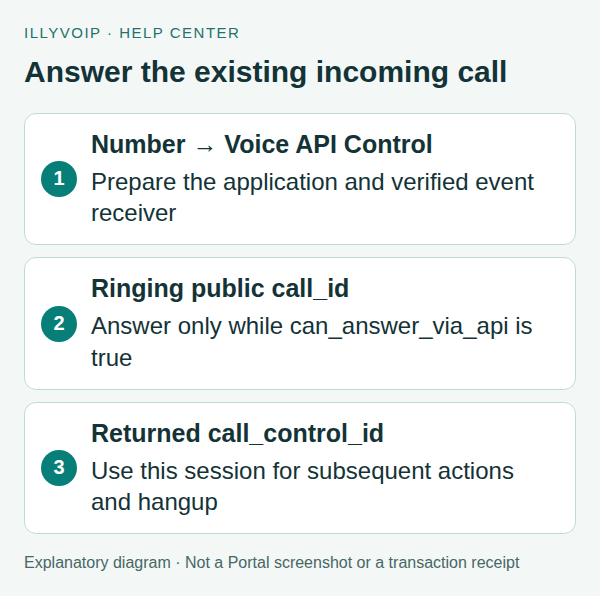
To answer an incoming number from your backend application, route that number to Voice API Control, receive or inspect the ringing call, and send its public call_id to the Answer endpoint while can_answer_via_api is true. Save the returned call_control_id for subsequent actions.
This is server-side programmable calling. It is separate from registering a desk phone or embedding the Webphone SDK in a browser. A configured webhook alone does not answer an incoming call.
1. Prepare the application before changing the number
The examples use a terminal with cURL and a server-side API key supplied through the ILLYVOIP_API_KEY environment variable. Keep the key out of browser code, screenshots and source control. Follow the API quickstart to reveal your key using the Portal’s verification prompts. Examples are templates, not records of a completed transaction; replace placeholders deliberately before running them.
You need an active number you are authorized to route, API access, the required account/service readiness and a backend able to receive and process the documented events promptly. Changing a number’s route affects future incoming calls, so prepare the application first and retain the previous working destination privately.
Check Voice API backend status:
curl --silent --show-error --fail-with-body \
  'https://api.illyvoip.com/api/v1/voice/backend/status' \
  -H "X-Api-Key: ${ILLYVOIP_API_KEY:?Set ILLYVOIP_API_KEY}"
An operational result is a readiness signal, not proof that your number route, webhook and application logic are all correct. This tutorial’s call actions can create billable usage; use a controlled number and an authorized test caller.
2. Configure and verify the event receiver
Follow the webhook guide to configure the required call events, including call_ringing, and validate signatures against the raw body. Acknowledge delivery promptly and make processing idempotent using the stable event ID. Your application must also tolerate duplicate or delayed deliveries.
Keep the account API key on the backend. A webhook secret and an API key serve different purposes; neither should be sent to a browser as a shortcut. Store the public call reference with the application’s own correlation record.
3. Select Voice API Control for the intended number
- Open Services → Phone Numbers.
- Locate the active number and select Configure.
- Confirm the exact number shown in the routing dialog.
- Under Route inbound calls to, choose Route to Voice API Control when that option is available for the number/account.
- Review and save, then reopen the configuration to confirm the selected route.
If the number offers Fax to email, confirm it is intended for voice rather than exclusive fax use before this change. If the option is unavailable, check the actual account/number capability with Support. Do not assume it can be enabled by substituting a different destination type. Do not move a working customer number before your application is ready to handle its calls.
4. Identify an answerable incoming call
From a call_ringing event, use the actual public call_id only when can_answer_via_api is true. The active-calls endpoint can also supply the current call information:
curl --silent --show-error --fail-with-body \
  'https://api.illyvoip.com/api/v1/voice/calls/active' \
  -H "X-Api-Key: ${ILLYVOIP_API_KEY:?Set ILLYVOIP_API_KEY}"
A delayed event may describe a call that has already ended. Do not treat every incoming notification as an instruction to create a new outgoing call. The normal endpoint for answering this existing inbound call is Answer, not Create.
5. Answer while the call is still ringing
The shell examples use jq to build JSON safely. Set CALL_ID to the actual public reference, and ANSWER_KEY to a unique key retained for this answer attempt.
jq -n --arg call "${CALL_ID:?Set the ringing public call reference}" \
  '{call_id:$call}' > answer-request.json
curl --silent --show-error --fail-with-body \
  'https://api.illyvoip.com/api/v1/voice/call-control/answer' \
  -H "X-Api-Key: ${ILLYVOIP_API_KEY:?Set ILLYVOIP_API_KEY}" \
  -H "Idempotency-Key: ${ANSWER_KEY:?Set a stable answer-attempt key}" \
  -H 'Content-Type: application/json' \
  --data-binary @answer-request.json > answer-response.json
Check HTTP and JSON status. Save call_control_id from the successful response and associate it with the original public call ID. Do not invent this value or interchange the two identifiers.
If Answer times out, retry with the same public call_id; the documented behavior reuses the existing session. Keep the same logical attempt information. An ended call cannot be answered, and a retry is not a way to resurrect it.
6. Perform a supported action and finish deliberately
For example, Speak can play synthesized text into the answered call. Choose optional voices and languages from the voice_api catalog if you need an explicit selection; otherwise this minimal example uses the current default. Set CALL_CONTROL_ID from Answer and retain a distinct SPEAK_KEY for this one action.
jq -n --arg session "${CALL_CONTROL_ID:?Set the returned control session}" \
  '{call_control_id:$session,text:"Thank you. Your test call has connected."}' \
  > speak-request.json
curl --silent --show-error --fail-with-body \
  'https://api.illyvoip.com/api/v1/voice/call-control/speak' \
  -H "X-Api-Key: ${ILLYVOIP_API_KEY:?Set ILLYVOIP_API_KEY}" \
  -H "Idempotency-Key: ${SPEAK_KEY:?Set a stable key for this speech action}" \
  -H 'Content-Type: application/json' \
  --data-binary @speak-request.json > speak-response.json
Speech has its own documented charge. Inspect action results and current call state rather than assuming HTTP success proves the caller heard the entire greeting. Do not immediately hang up just because the action request returned; wait for the intended interaction to finish using the documented state/event workflow and your application logic.
When you intend to end the controlled call:
jq -n --arg session "${CALL_CONTROL_ID:?Set the returned control session}" \
  '{call_control_id:$session}' > hangup-request.json
curl --silent --show-error --fail-with-body \
  'https://api.illyvoip.com/api/v1/voice/call-control/hangup' \
  -H "X-Api-Key: ${ILLYVOIP_API_KEY:?Set ILLYVOIP_API_KEY}" \
  -H 'Content-Type: application/json' \
  --data-binary @hangup-request.json
7. Verify the whole incoming path
For a controlled test, confirm the number’s saved route, the incoming call/event, answer eligibility, the Answer result, the returned control session, the intended action and the final call outcome. Keep public call references and request times for support; exclude secrets and unnecessary caller data from logs.
- No ringing event: inspect number routing and webhook delivery records; do not assume a specific carrier failure.
- Not answerable: confirm this is the intended Voice API Control call and it is still ringing.
- Answer succeeded but a later action fails: use the returned control-session ID and inspect the action’s exact error and current state.
- Duplicate webhook: deduplicate the event; do not create a second workflow.
8. Reconcile incoming calls after an application interruption
If your application restarts or loses its event connection, reload its durable operation records before taking new call actions. Keep the original public call_id, any returned call_control_id, answer-attempt key, completed-action results and last known state. A lost process is not evidence that the call ended or that its last action failed.
Use the read-only active-calls endpoint to inspect calls currently visible to the account. Match by the actual public call reference, not only a telephone number or arrival time. A caller can call twice, and two calls can share the same displayed number.
- Still ringing and can_answer_via_api is true: reconcile the existing answer attempt and use the same public call reference. Do not create an outgoing replacement call.
- A control reference is already present: use that owned control session for the documented status request before deciding whether another action is needed.
- The control reference is null: do not invent one. A ringing call may not yet have a control session; inspect its current answer eligibility and the saved answer operation.
- The call is absent from the active list: it may have ended or no longer be visible as active. Reconcile with your stored result, control-session status when available, relevant events and call history. Absence alone does not prove that the earlier answer or action failed.
9. Read the saved control session before resuming actions
For an existing returned control reference, the status endpoint uses a POST even though this operation reads call state. Keep the account key on the backend and inspect the exact response rather than replaying a whole workflow.
jq -n --arg session "${CALL_CONTROL_ID:?Set the saved control reference}"   '{call_control_id:$session}' > status-request.json
curl --silent --show-error --fail-with-body \
  'https://api.illyvoip.com/api/v1/voice/call-control/status' \
  -H "X-Api-Key: ${ILLYVOIP_API_KEY:?Set the server-side key}" \
  -H 'Content-Type: application/json' \
  --data-binary @status-request.json > status-response.json
A current state tells you about the call, not every business action your application completed before the interruption. Preserve an action ledger. Do not repeat a greeting, gather, transfer or paid speech request simply because a fresh worker has no in-memory state.
Use endpoint-specific replay rules with the original payload and logical operation identity. If a result remains unresolved, put the workflow into review rather than issuing an unbounded sequence of status requests or new actions. Coordinate workers so only one resumes control of the same call.
10. Verify recovery with interruption fixtures
Test a restart before Answer, a lost Answer response, an active call with a returned control reference, a null control reference, a call that ended during restart and a late duplicate webhook. Confirm that no branch creates a second outgoing call or replays a completed paid action.
Keep backend availability, call availability and application progress separate. An operational backend response does not prove a particular call remains answerable. Local recovery fixtures are useful acceptance evidence for the application logic; live call continuity requires its own authorized test.
Frequently asked questions
Will this route ring my SIP phone too?
It selects application-controlled incoming handling. Do not assume parallel ringing of a separate SIP destination.
Is the public call ID the control-session ID?
No. Answer takes the public call ID and returns the control-session ID used by subsequent actions.
Does a successful backend-status request prove the integration works?
No. Verify number routing, event delivery, application handling and the actual call outcome separately.
Related guides and reference
For current endpoint parameters and examples, use the IllyVoIP developer resources and public API specification.
Instructions reviewed on 10 October 2026. Available controls and service options depend on your account. Use the current values shown in your Portal.