
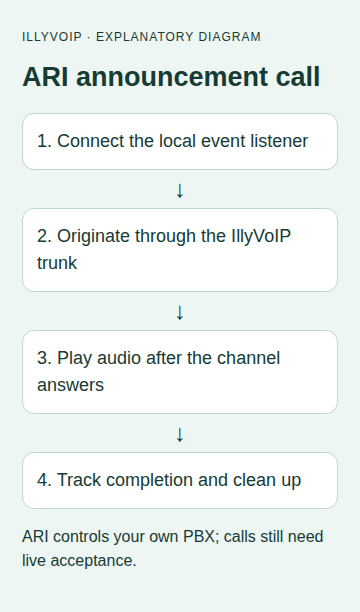
This guide uses Asterisk’s REST Interface, ARI, on a PBX you administer to call an approved number through an existing IllyVoIP PJSIP trunk and play a short announcement. Your application controls the local Asterisk channel; IllyVoIP carries the outgoing call.
There is no need to access IllyVoIP’s internal PBX or management interfaces. ARI credentials belong to your own Asterisk server and are different from your IllyVoIP SIP credentials and Portal API key.
1. Verify the call path before adding ARI
Start with Asterisk 22 and a working PJSIP trunk. Confirm the endpoint name, outgoing number format, allowed caller ID and permitted destinations from your existing trunk configuration. In the Portal, use the SIP line’s current technical details rather than copying another account’s server or transport.
Approve a test number you control and a brief announcement. A completed outgoing call may be chargeable. First verify an ordinary call through this trunk with two-way audio; ARI will not repair a failing registration, IP authorization rule or RTP path. Keep that known working call as your baseline.
2. Enable ARI only on the private local interface
The sample application runs on the same server as Asterisk. Merge the relevant settings into your existing configuration; do not replace a production configuration wholesale. In http.conf, the local HTTP listener can be configured as:
[general]
enabled=yes
bindaddr=127.0.0.1
bindport=8088
In ari.conf, add a dedicated application user with a strong private password:
[general]
enabled=yes

[illy-notice-app]
type=user
read_only=no
password=REPLACE_WITH_A_PRIVATE_PASSWORD
Apply the change using your PBX’s normal configuration process. Check that ARI, HTTP WebSocket and the needed Stasis/playback modules are available. Keep port 8088 private. The HTTP and WebSocket URLs below use loopback; if the application runs elsewhere, design authenticated TLS and network restrictions for that deployment instead of exposing this example listener publicly.
3. Prepare the sound file
Create the short announcement as a format your Asterisk installation can play and place it in the configured sounds directory under custom/approved-notice, with the appropriate extension. For example, a supported mono PCM WAV can be used after checking its sample rate and encoding against your installed file modules. Do not rename an MP3 to .wav and expect conversion.
Give the Asterisk process read permission, then confirm local playback in your test environment. The ARI media URI uses sound:custom/approved-notice without a file extension. Keep the announcement free of private information unless that recipient is authorized to receive it. Do not include an instruction that depends on collecting keypad input; this example only plays audio.
4. Install the local application
Use a private Python 3.11+ environment with Requests and websocket-client. Pin the dependency versions you validate for your installation.
python3 -m venv .venv
.venv/bin/python -m pip install requests websocket-client
Supply ARI_USER and ARI_PASSWORD from the private ARI account. Set ARI_TRUNK to your existing PJSIP endpoint name, ARI_DESTINATION to approved international dial digits without + for this example, and ARI_CALLER_ID to the caller identity permitted by your trunk. The example assumes your working endpoint supports the PJSIP/number@endpoint dial form; retain your verified endpoint routing design.
Save this as notice.py. It connects the event WebSocket before originating, reserves channel and playback IDs locally and never automatically repeats an originate request.
import base64, json, os, re, time, uuid
from pathlib import Path
import requests
import websocket

def notify(directory):
    destination = os.environ['ARI_DESTINATION']
    trunk = os.environ['ARI_TRUNK']
    if not re.fullmatch(r'[1-9][0-9]{6,14}', destination):
        raise ValueError('Use approved international dial digits')
    if not re.fullmatch(r'[A-Za-z0-9_-]+', trunk):
        raise ValueError('Use your existing PJSIP endpoint name')
    user, password = os.environ['ARI_USER'], os.environ['ARI_PASSWORD']
    channel, playback = str(uuid.uuid4()), str(uuid.uuid4())
    path = Path(directory)
    path.mkdir(mode=0o700)  # Existing operation directories cannot be replayed.
    (path/'operation.json').write_text(json.dumps({'channel':channel,'playback':playback,
        'destination':destination,'trunk':trunk}))
    def state(value): (path/'state.txt').write_text(value)
    session = requests.Session()
    session.trust_env = False
    session.auth = (user,password)
    base = 'http://127.0.0.1:8088/ari'
    token = base64.b64encode((user+':'+password).encode()).decode()
    ws = None
    attempted = False
    try:
        ws = websocket.create_connection('ws://127.0.0.1:8088/ari/events?app=illy_notice',
            header=['Authorization: Basic '+token], timeout=10)
        state('ATTEMPTING')
        attempted = True
        response = session.post(base+'/channels', params={
            'endpoint':'PJSIP/'+destination+'@'+trunk, 'app':'illy_notice',
            'channelId':channel,'callerId':os.environ['ARI_CALLER_ID'],'timeout':30}, timeout=(3,10), allow_redirects=False)
        (path/'originate-http.txt').write_text(str(response.status_code))
        response.raise_for_status()
        state('WAITING_FOR_ANSWER')
        deadline = time.monotonic()+75
        playing = False
        while time.monotonic() < deadline:
            ws.settimeout(max(0.1, deadline-time.monotonic()))
            event = json.loads(ws.recv())
            kind = event.get('type')
            own = event.get('channel',{}).get('id') == channel
            if own and kind == 'StasisStart' and not playing:
                if event['channel'].get('state') != 'Up':
                    raise RuntimeError('Review unexpected channel state')
                playing = True
                state('PLAYBACK_REQUESTED')
                result = session.post(base+'/channels/'+channel+'/play/'+playback,
                    params={'media':'sound:custom/approved-notice'},timeout=(3,10),allow_redirects=False)
                result.raise_for_status()
            elif kind == 'PlaybackFinished' and event.get('playback',{}).get('id') == playback:
                state('PLAYBACK_FINISHED')
                break
            elif own and kind in ('StasisEnd','ChannelDestroyed'):
                state('CHANNEL_ENDED')
                break
        else:
            state('REVIEW_DEADLINE')
    except Exception:
        state('REVIEW_UNCERTAIN' if attempted else 'NOT_ORIGINATED')
        raise RuntimeError('Review operation record and PBX; do not repeat originate') from None
    finally:
        if attempted:
            try:
                result = session.delete(base+'/channels/'+channel,timeout=(3,5),allow_redirects=False)
                (path/'cleanup-http.txt').write_text(str(result.status_code))
                # 404 means this ID is no longer an active ARI channel.
                if result.status_code not in (204,404): state('REVIEW_CLEANUP')
            except requests.RequestException:
                state('REVIEW_CLEANUP')
        if ws is not None: ws.close()
        session.close()

if __name__ == '__main__':
    import sys
    os.umask(0o077)
    notify(sys.argv[1])
5. Run one approved operation
.venv/bin/python notice.py /private/path/notice-operation-001Choose a new directory only for a genuinely new approved call. The script refuses an existing directory. It saves the planned IDs before the request, waits for the channel to enter its Stasis application, requests playback and then attempts to hang up that exact channel. A WebSocket event for another channel is ignored.
The dial timeout is 30 seconds and the application’s event deadline is 75 seconds. These application settings are not a provider delivery guarantee. Only one application instance should own the illy_notice Stasis application in this example; running competing listeners can change event ownership.
6. Interpret the saved state
| Observation | Meaning |
|---|---|
| WAITING_FOR_ANSWER | The originate HTTP request succeeded. This is not proof that the destination answered. |
| PLAYBACK_REQUESTED | The application requested the sound after the channel entered Stasis in the Up state. |
| PLAYBACK_FINISHED | A matching playback-finished event was received. It does not establish that a person heard or understood the message. |
| CHANNEL_ENDED | The channel left the application or was destroyed before the matching playback completion was seen. Review the event and call record. |
| REVIEW_UNCERTAIN or REVIEW_CLEANUP | Inspect the operation IDs and active PBX channels before any replacement call. |
The cleanup response is stored separately. A 204 indicates that the hangup request succeeded; 404 indicates that this ID is no longer present at that endpoint. A transport timeout does not establish either outcome. If the process is killed or the host fails, its finally block cannot be relied on. Before unattended use, add an independent operational check for stale owned channels and a reviewed maximum call lifetime on your PBX.
7. Validate failures before scheduling calls
- Test the client with mocked ARI responses and events, including an unrelated channel event, successful playback, an early channel end and a transport exception.
- Confirm that an existing operation directory blocks another attempt.
- On your test PBX, verify a missing sound file, unanswered destination and dropped event connection produce a reviewable result.
- Approve one live call and confirm the intended phone rings, the complete announcement is audible and the call ends.
- Compare the local channel IDs and timestamps with your PBX and IllyVoIP call records. Do not infer cost or delivery from a single HTTP response.
If an originate request times out, query your own PBX for the saved channel ID and inspect call history. A channel that has already ended will not appear in an active-channel query, so absence alone does not prove the call never happened. Reconcile first; a fresh directory and channel ID would create a new call.
Related guides and official references
- Connect an Asterisk PJSIP trunk to IllyVoIP
- Place an outbound notification call with the Voice API
- Start with the API, Playground and webhooks
Reviewed 9 October 2026 against current IllyVoIP implementation and the linked sources. Use your account’s available options and installed software version. Local example checks do not establish a completed live call, delivered SMS or certified third-party integration.