
What this setting controls
Call failure handling controls the response when Caller ID or fraud-control checks reject an outgoing call before routing. It does not change the receiving person's voicemail, make a rejected call allowed, or replace every network error with a custom message.
Choose the behavior
- Open Account settings — Call handling.
- Under Failed call behavior, select the option that suits your calling application.
- Save the setting and check that the page confirms the change.
- Hang up with SIP code only (no audio): your phone or PBX receives the rejection response without a spoken explanation. This is useful when your application handles SIP errors itself.
- Play local audio prompt, then hang up: the caller hears an explanation before the call ends.
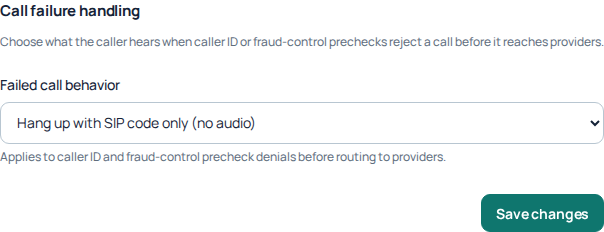
Failed call behavior controls how supported pre-routing rejections are presented. The captured selection is one account’s current setting, not a recommendation; no change was saved. Open the image for a larger view.
Choose the option for the application making the call
For a person calling from a desk phone or softphone, an audio explanation can make a supported rejection easier to understand. For a PBX or application that already interprets SIP responses, SIP-only handling may fit its own error display. Select according to how your application handles failures; this setting is not a general call-quality adjustment.
- Open Settings → Voice → Call handling.
- Find Failed call behavior and read both options before choosing.
- Select Save changes in that section. The custom caller ID approval form below it is a separate action.
- Wait for the save confirmation, reopen Call handling and confirm that your chosen option remains selected.
If saving fails, keep the error and reload the current setting before trying again. A selected option that has not been successfully saved is not evidence that the account behavior changed.
Fix the reason, not just the response
If a legitimate call is rejected, review the Caller ID selected on the line, its verified-number eligibility, package permissions and your destination restrictions. Changing this setting does not bypass those rules. If an approval request is offered, explain your intended use accurately and wait for the decision.
Investigate an unexpected result
Start with the call reference and reported rejection. A busy destination, a provider error, an unanswered incoming call and a local caller-ID precheck are different situations. This control covers the supported caller-ID and Fraud Control prechecks before provider routing; it does not promise audio for all failed calls.
If the call shows a country, prefix or price restriction, follow the Fraud Control guide. If it shows caller-ID eligibility, check the selected line and package. Do not deliberately trigger chargeable calls or weaken restrictions merely to hear the prompt. Use an authorized troubleshooting attempt when needed, retaining its time, reference and actual outcome.
When to contact Support
Provide the public call reference, time, destination and displayed error. Explain whether you expected audio or a SIP response. Do not share your SIP password. Incoming forwarding, number destinations and queue behavior are configured separately, not by this setting.
Related guides
Reviewed 10 October 2026 against the current IllyVoIP Portal and service implementation. Available controls depend on account access and service state.