
A FreePBX outbound route decides which dialed numbers use your IllyVoIP trunk and how those digits are changed before transmission. Work out the intended transmitted number first, then express only the transformations your users need.
This guide targets the FreePBX17 outbound-route interface with a working IllyVoIP PJSIP trunk. It is not a trunk-registration tutorial. You need PBX administrator access, a private configuration backup, one authorized test extension and a known destination you control.
1. Record the existing route before editing
Open Connectivity → Outbound Routes. Note route order, current patterns and trunk sequence. Record any restriction or time condition that affects the intended extension. Do not change emergency calling or established production routes as part of a general example.
Confirm that the IllyVoIP line permits the intended destination and caller ID, and check its rate and balance. A FreePBX pattern can select a destination; it cannot grant permissions that the IllyVoIP account does not have.
2. Write down input and output digits
Decide whether users dial complete international numbers, an outside-line access digit, or a deliberate international access prefix. Do not mix these conventions without examples.
- Example user input: 442079460123 Intended transmitted digits: 442079460123 Required change: None.
- Example user input: 9442079460123 Intended transmitted digits: 442079460123 Required change: Remove the outside-line 9.
- Example user input: 00442079460123 Intended transmitted digits: 442079460123 Required change: Remove the agreed 00 prefix.
These are documentation examples, not destinations to call. Use a real authorized test number and the international dialing form accepted by your IllyVoIP configuration. Do not assume every leading zero is an access prefix: it can be part of a country's number.
3. Understand each pattern field
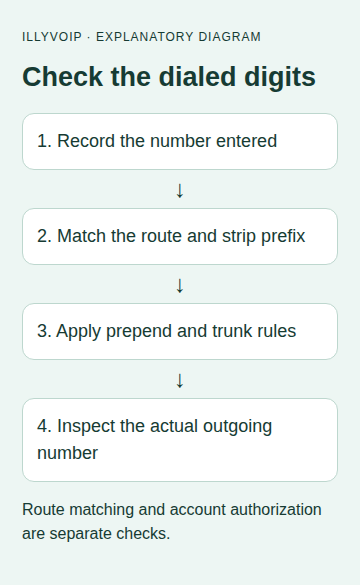
FreePBX compares the dialed number against the prefix plus match pattern. When it matches, the prefix is removed, then the prepend digits are added before the number goes to the selected trunk.
| Field | Purpose |
|---|---|
| Prepend | Add these digits after a successful match. |
| Prefix | Match and remove these leading digits. |
| Match pattern | Match the remainder of the dialed number. |
| CallerID match | Additional selection condition where used; not a replacement for authenticating the caller or enforcing access. |
In the common pattern notation, X matches a digit 0–9, Z1–9 and N2–9. Brackets describe a set/range. A dot allows one or more following characters and an exclamation mark has immediate-match behavior. Broad wildcard patterns can admit more than intended; do not use them as the first test.
4. Start with a literal destination
For a narrow test using the example international number, the following rows illustrate the transformations. Leave prepend blank in all three.
| Prepend | Prefix | Match pattern |
|---|---|---|
| Blank | Blank | 442079460123 |
| Blank | 9 | 442079460123 |
| Blank | 00 | 442079460123 |
Use only the row for the dialing convention you actually need, replacing the sample with your authorized test destination. A literal pattern keeps the first check bounded. To prepend a country code later, first establish the exact local-number convention, including any trunk-prefix rule; do not blindly add a country code to every number.
5. Select the IllyVoIP trunk and review route order
In the route's trunk sequence, select the intended IllyVoIP trunk. Compare earlier outbound routes: another matching route may be selected before your new route. A route named IllyVoIP does not prove that a call used that trunk.
Also inspect any trunk-side digit manipulation. A correct outbound-route transformation can be changed again by the trunk configuration. Keep a complete worksheet of input digits, route result and final transmitted digits.
Restrict use through the access controls available in your installation. Naming a route Test is not an access restriction. Do not let untrusted inbound contexts reach unrestricted outgoing routes.
6. Apply and verify one call
- Submit the reviewed route and use Apply Config in an appropriate change window.
- From the authorized extension, enter the agreed test digits.
- Inspect the PBX call record or short authorized log to confirm selected route/trunk and transmitted number.
- Compare the corresponding IllyVoIP call record when available.
- Confirm the intended recipient, outgoing caller ID and two-way audio.
A chargeable answered call can occur during testing. If the wrong destination or trunk is selected, stop before expanding the pattern. Keep logs private.
7. Expand only after the literal test passes
Replace the literal match with reviewed country/length patterns only where needed. Test representative allowed and disallowed inputs without placing unauthorized calls. Include numbers with the optional access digit, missing digits, an already present country code and unexpected prefixes.
Use your organization's maintained numbering policy instead of treating an example pattern as a complete worldwide numbering plan. Preserve emergency and special-service handling separately with the responsible administrator.
Troubleshooting
- Wrong trunk: inspect earlier route matches and the trunk sequence.
- Country code duplicated: compare prepend with what users already dial.
- Digits missing: check prefix removal and trunk-side rewriting.
- No matching route: compare the actual entered string against prefix plus match pattern.
- Correct digits but rejected call: inspect IllyVoIP's returned evidence, permissions and caller-ID policy rather than broadening the pattern indiscriminately.
Related guides and official references
- Set up an IllyVoIP PJSIP trunk in FreePBX
- My SIP phone is registered, but outgoing calls fail
- Start with the API, Playground and webhooks
Reviewed 9 October 2026 against current IllyVoIP implementation and the linked sources. Use your account’s available options and installed software version. Local example checks do not establish a completed live call, delivered SMS or certified third-party integration.