
Use the Voice API’s speech gather action when a caller should answer a short question aloud. Your application supplies the prompt, collects the resulting transcript and decides what to do next. Speech recognition is an interpretation of the recording; confirm important choices instead of treating every transcript as an instruction.
This guide is for a backend developer with an authorized Production API key and an active call controlled by that account. Start with the existing outbound-call guide if you have not established a call. Sandbox responses are useful for contract tests but do not prove microphone capture, pronunciation or recognition quality.
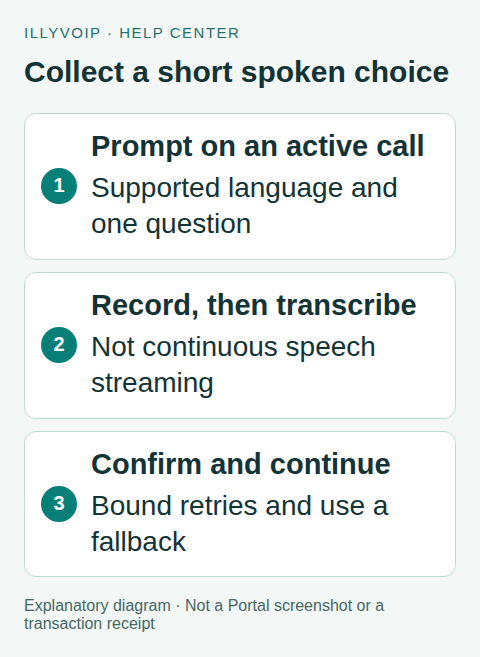
1. Prepare the call and supported language
Keep the actual call_control_id returned for the call and verify that it is active before collecting input. A public Call Reports reference is not a substitute. Check the current speech-language catalog with GET /api/v1/stt/languages?context=voice_api using the account’s API key. Choose a supported language for this context; a language available in another IllyVoIP product is not automatically available for Voice API recognition.
Store the call’s workflow state in your backend. Allow only one intended gather step at a time. Set a maximum number of attempts and a clear exit: an appropriate keypad alternative, an approved transfer, or a polite end to the call. Explain recording and processing to the caller where your use case requires it.
2. Build a short, answerable prompt
Ask one question, such as whether the caller wants Sales or Support. Tell the caller to answer after the prompt finishes. The current speech gather flow plays the prompt, records a response and then transcribes it. Do not describe it as continuous conversational streaming or promise that speech over the prompt will be recognized.
Use a supported prompt language and voice. Prompt playback language and speech recognition language are separate settings. Keep both appropriate for the caller. If using an audio URL instead of text, follow the current media URL requirements and confirm that the service can fetch the intended file.
3. Submit the gather action once
The example below illustrates the request body for POST /api/v1/voice/call-control/gather. Replace the example language only with a value confirmed by the catalog:
{
  "call_control_id": "YOUR_ACTIVE_CALL_CONTROL_ID",
  "input": "speech",
  "prompt_text": "After this message, say sales or support.",
  "prompt_language": "en-US",
  "speech_language": "en-US",
  "timeout_ms": 8000
}
Send Content-Type: application/json, X-Api-Key and a stable Idempotency-Key. Save the call ID, step ID, exact request body and key before submitting. Reuse that identity only for the same operation and unchanged payload. A new attempt after a completed no-input result is a new deliberate step, not a retry of an unknown previous result.
The current input bounds are 1,000–120,000 milliseconds for timeout_ms. These are collection controls, not a promise that the entire HTTP request finishes in that interval: prompt playback and transcription add work. Set the backend HTTP deadline accordingly and reconcile uncertain outcomes before starting another gather. max_digits is a keypad setting and does not limit a spoken transcript.
4. Interpret the completed result
A successful speech result identifies input: speech and includes transcript, the call control ID and available TTS/STT charge details. Inspect the actual status and required fields before advancing your workflow. A successful HTTP exchange is not proof that the caller said a valid choice.
Trim whitespace and compare a deliberately small set of accepted responses. If the transcript clearly matches “sales”, ask the caller to confirm Sales before an important transfer. If it is empty, ambiguous or outside the menu, use a bounded clarification. Never dial a number, execute code or change an account merely because that text appeared in the transcript.
5. Handle silence, errors and disconnects
- No usable response: repeat a shorter explanation once if your policy permits, then offer the fallback.
- Unsupported language or invalid input: correct the configuration using the catalog; do not loop the same invalid request.
- Caller disconnected: check the call state and stop subsequent actions.
- Network timeout: retain the operation identity and use the documented recovery behavior. Do not assume that timeout means no recording or charge occurred.
- Recognition failure: tell the caller what they can do next without exposing internal errors.
Keep diagnostic logs limited to operation IDs, status and timing. Spoken responses may contain personal information; decide whether transcript retention is necessary and protect any stored content.
6. Test the complete interaction
First test application decisions using fixtures: a valid choice, extra whitespace, an unrelated sentence, an empty transcript, an error, an uncertain request and a disconnected call. Verify the maximum attempt count and that repeated processing cannot trigger two transfers.
Then make a small authorized Production test using participants who know the purpose. Check prompt timing, the selected language, silence behavior, confirmation and fallback. Review actual charges and call outcomes. Text fixtures and Sandbox can verify application logic; they cannot certify live recognition or audio quality.
Frequently asked questions
Can I use this as a free-form voice agent?
This action is one prompt-and-response operation. A conversation requires your own state, decision rules and bounded recovery, or the appropriate IllyVoIP voice-agent product.
Does an empty transcript mean the caller remained silent?
Not necessarily. Audio capture, language mismatch or recognition problems can also leave no useful text. Use the available result and an appropriate fallback.
Related guides and references
- Voice api dtmf phone menu
- Transcribe audio speech to text api
- Voice agent flows and integrations
- Official reference: api.illyvoip.com
- Official reference: illyvoip.com
Reviewed 8 October 2026 against current IllyVoIP source and official documentation. Configuration examples are not evidence of a completed hardware or live integration test. Use the current options and limits available to your account.