
If a generated prompt reads a name, date or abbreviation incorrectly, start with the text you send to the IllyVoIP Text-to-Speech API. Keep the intended language and voice fixed, rewrite the ambiguous phrase and compare a short output before generating the full prompt.
This guide uses IllyVoIP’s standalone speech endpoint. It does not require exporting a call recording into another application, and it does not add a pronunciation-dictionary feature to the Portal.
1. Keep a copy of the original request
- Save the original text, chosen language and voice, output format and the resulting audio privately.
- Identify the exact phrase that sounds wrong. Distinguish pronunciation from a file that will not play at all.
- Confirm the intended spoken meaning with the person who owns the wording, especially for names, dates and account references.
- Choose a short test sentence containing that phrase rather than repeatedly generating the whole script.
Do not change voice, language, text and output settings in the same comparison. If all four change, it is difficult to know which change improved the result. Submitted text can contain personal information, so use a synthetic example while developing the workflow.
2. Choose a current language and voice
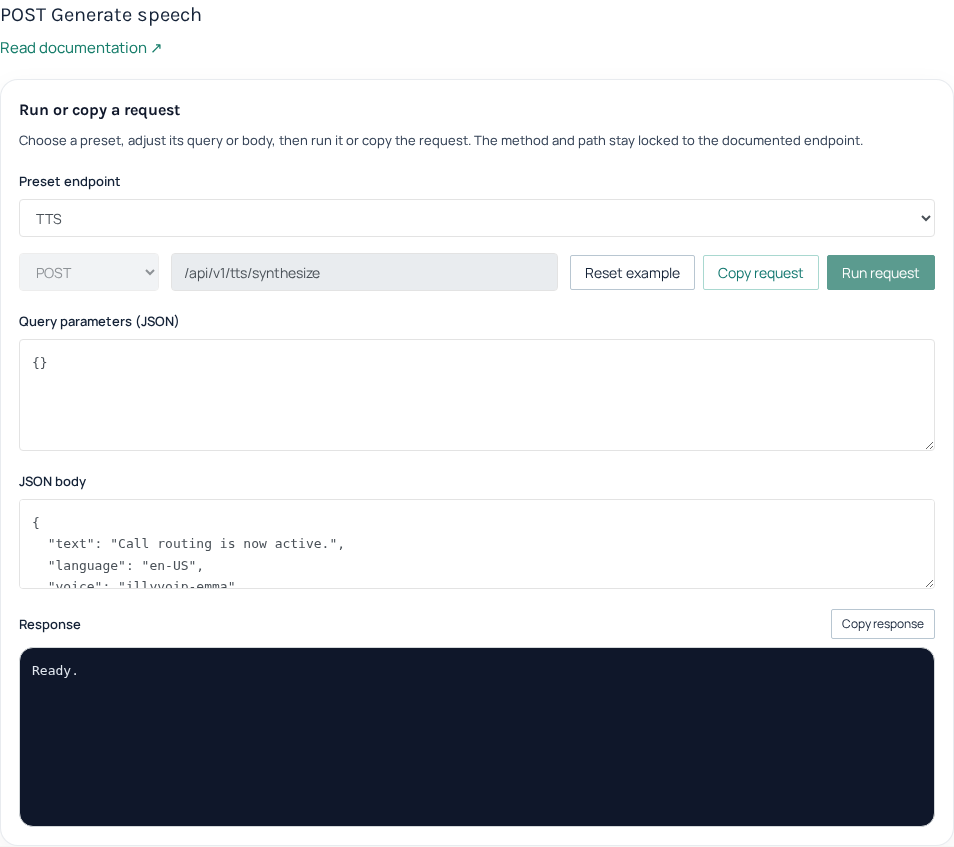
Read GET /api/v1/tts/languages and GET /api/v1/tts/voices with the speech_api context. Use the returned language and voice identifiers exactly. A voice’s display name is not a substitute for its API key. The linked synthesis guide gives the complete authenticated requests.
The IllyVoIP contract accepts text, language, voice, format, sample rate and channel choices for synthesis. It does not document the provider-specific normalization, model-selection, SSML or pronunciation-dictionary parameters you may see in other products’ tutorials. Do not add those fields and assume they are supported.
3. Rewrite ambiguous text as spoken wording
Numbers and symbols can have several valid readings. ElevenLabs’ pronunciation guidance recommends writing the intended spoken form explicitly. Apply that plain-text technique to the text you submit through IllyVoIP; the vendor’s separate API settings do not become IllyVoIP options.
- Date: replace an ambiguous numeric date with words that state the intended month and day. Confirm the original meaning first.
- Amount: spell out the amount and currency when a symbol could be read in several ways.
- Acronym: try a spaced-letter or written-out form if the abbreviation should not be read as a word.
- Name: ask the person for the intended pronunciation, then try a modest phonetic spelling in the spoken copy. Keep their correct spelling in the customer record.
- Reference digits: write the intended digit sequence rather than letting a long number become an ordinary quantity.
These are text-editing techniques, not guarantees. Listen to the exact voice and language you plan to use. Keep the displayed or legally required wording separate from a pronunciation-adjusted spoken copy, and confirm that the adjustment preserves its meaning.
4. Generate one short comparison deliberately
- Prepare a request to
POST /api/v1/tts/synthesizeusing the current catalog values and a short revised sentence. - Keep within the documented 2,000-character limit. Use WAV or MP3, a supported sample rate between 8,000 and 48,000 Hz, and one or two channels as required by the destination.
- Review the current speech price and account balance. Synthesis is a paid action; a text edit is not a free preview.
- Submit once and require a successful HTTP and JSON result. Decode
audio_base64according to the returnedmime_type, following the complete synthesis guide. - Listen to the result and compare the phrase against your intended wording. Record which request produced each file.
If the result is uncertain after a timeout, investigate the original request before repeating it. The Playground does not advertise a caller-supplied idempotency key for this synthesis operation. Do not run an uncontrolled retry loop or assume a changed request is free.
5. Finish the full prompt and keep the accepted file
Once the short wording is acceptable, apply it to the full text and review the complete output. Check the beginning and end, pauses, names and any numbers. A successful API response proves an audio result was returned, not that every word was pronounced as intended or that a downstream call played it.
Save the accepted audio and its request metadata so your application can reuse the reviewed asset where supported instead of regenerating it unnecessarily. For a persistent pronunciation problem, give Support a minimal non-sensitive phrase, the voice and language, and the relevant request time. Do not include API keys or whole customer conversations.
Related guides
- Convert text to speech with the IllyVoIP API and save the audio
- Generate and save speech in Python with the IllyVoIP Text-to-Speech API
- Generate and save speech in JavaScript with the IllyVoIP TTS API
Reference
Current instructions and technical reference: ElevenLabs: writing spoken numbers and abbreviations.
Reviewed 12 October 2026 against the current IllyVoIP controls, implementation and applicable references. Available options depend on account permissions and service state.