
Choose the agent and prepare reliable facts
Open Voice Agent Studio, select the intended agent and open AI Assistant. Editing requires Voice Agents: Manage permission; view-only access does not allow changes. Keep business facts in Knowledge and speaking style in the tone/guidance controls.
Prepare current opening hours, services, eligibility, prices you are authorized to quote and escalation instructions. Keep a rule and its exceptions together. For example, an appointment policy should include who can book and when a person must help. Do not add credentials, payment-card details or private customer records.
Add information or a question and answer
- Choose Add information for a titled business fact, or Add question & answer for a specific question and its approved answer.
- Write a clear title/question and concise content. Use the displayed size counter; the limit is measured in bytes, not simply the number of letters.
- Select Done, then inspect the entry and its Enabled switch.
- Use search and the entry-type filter to find related facts. Edit or disable outdated entries rather than leaving contradictory answers enabled.
Done updates the editor; finish with Update or Publish as offered and check the resulting status. Do not switch agents or leave with unsaved changes.
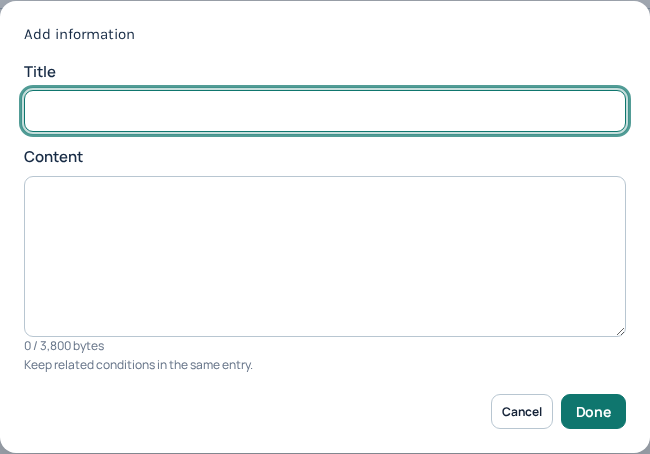
Add information separates the entry title from its content. Keep related conditions in the same entry and watch the byte counter. This empty entry has not been added. Open the image for a larger view.
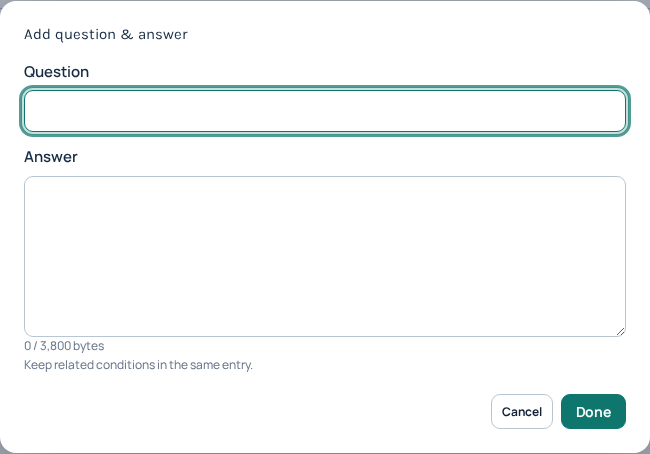
Add question & answer separates a caller’s question from the approved answer. This is an empty, unsaved entry; applying the complete knowledge changes is a separate step. Open the image for a larger view.
Import a CSV without losing existing entries
- Use Export CSV to keep a private copy before a large edit.
- Download CSV template and keep its column headers:
type,title/question,information/answer. Use the template’s information and qa examples. - Choose Import CSV and inspect the preview, entry count and duplicate warning.
- Add entries retains the current entries and adds the file. Duplicates are kept unless you remove them. Replace entries replaces the complete entry list after confirmation; it is not a merge.
- Check the result, apply the agent update and verify the saved state.
A rejected import does not mean the data was saved. Correct the reported header, content or size problem and review again. Keep exported knowledge private.
Website content needs review, not assumptions
Entering a business website address is not proof that its pages were imported or will stay synchronized. The current editor supports manual entries and CSV import. Review any material obtained from a website yourself before adding it, including old offers, unsupported promises and content intended only for employees.
Check the answer after applying changes
With permission, test a known fact, an exception, an unknown question and a request for a person. Real calls can incur charges. Confirm both the wording and the intended handoff; an AI answer is not guaranteed merely because an entry exists. If a wrong answer persists, check the selected agent, enabled entries, conflicting wording and update/publish status before adding more copies.
For Support, provide the agent name, public call reference, time/timezone, expected answer and a sanitized example of what happened. Continue with Voice Agent setup or flows and integrations.
Preserve disabled entries when moving knowledge by CSV
The CSV format can include an optional enabled column. Use it when a file contains facts you want to retain but keep unavailable to the assistant. Without this column, imported entries default to enabled. Removing the column from an export can therefore reactivate entries that you deliberately disabled.
- Open the intended agent’s AI Assistant knowledge editor and select Export CSV before a bulk change. Keep the file private.
- Retain the required headers
type,title/questionandinformation/answer. Add or preserveenabledwhen states matter. - Use
informationorqafor type. For enabled state, usetrue,false,1or0. A present but blank state is invalid; it is not the same as omitting the column. - Choose Import CSV and review the preview, entries and duplicate warning. Decide between Add entries and Replace entries based on the intended result.
- Inspect the Enabled switches after applying the local import, then finish the parent agent’s Update or Publish operation and verify the saved entries.
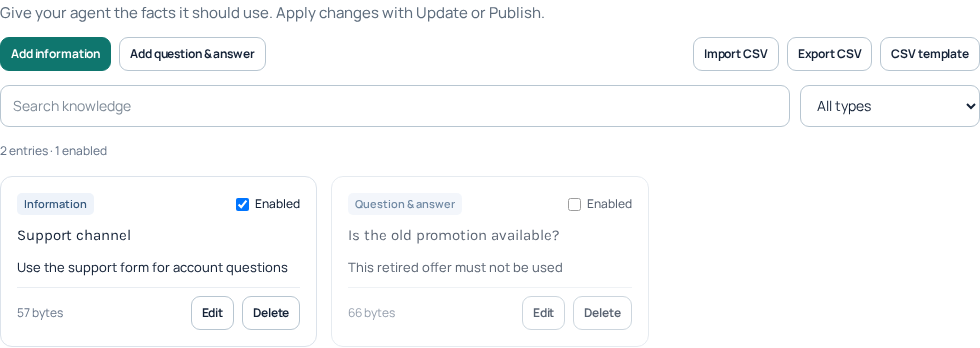
This fictional fixture keeps a current fact enabled and an obsolete offer disabled:
type,title/question,information/answer,enabled
information,Support channel,Use the support form for account questions,true
qa,Is the old promotion available?,This retired offer must not be used,false
Export includes the state column when at least one entry is disabled. If every exported entry is enabled, the three required columns are sufficient and a later import defaults those entries to enabled. Do not depend on a column position copied from another spreadsheet; preserve the actual header names and consistent row widths.
Check bytes and duplicate behavior before replacing knowledge
Each entry allows 3,800 UTF-8 bytes across its title/question and content/answer. The knowledge document and incoming CSV are limited to 120,000 bytes. These are not character counts: accented letters and many other scripts can occupy multiple bytes. The final document also has structure overhead, so a file close to the maximum may still be rejected after parsing. Use the editor’s validation instead of estimating from a spreadsheet’s letter count.
Add entries keeps existing items and appends the imported items; it does not merge matching questions. Duplicate warnings do not mean duplicates were removed. Replace entries replaces the whole list after confirmation. Review disabled entries as well as visible enabled facts before choosing it. If an import is rejected, fix the reported problem and preview again; do not assume part of the rejected file was applied.
For a small validation check, import the fixture into an unsaved new-agent editor, inspect both states and discard that unsaved editor when finished. Do not publish fictional knowledge to a live agent. For your real import, reopen the saved agent and verify both the content and the disabled state before relying on the assistant’s answers.
Reviewed 12 October 2026 against the current IllyVoIP controls, implementation and applicable references. Available options depend on account permissions and service state.