
For a repeated greeting or instruction, generate and review an audio asset once, keep it in your application’s versioned library, and play it into eligible Voice API calls. Your application owns that library and hosting. The call-control media reference returned for one call is not a permanent library URL.
Use an authenticated backend and the API base https://api.illyvoip.com. Send X-Api-Key and JSON bodies. Keep credentials out of browser code. Calls, SMS, lookups and speech can incur charges; examples are templates, not completed transactions.
1. Define the prompt’s identity and wording
- Give each prompt a stable purpose, language and version.
- Review the exact wording, names, numbers and any privacy implications.
- Keep customer-specific details out of a shared reusable asset.
- Record the text hash, selected voice and output settings with the generated file.
When wording changes, create a new version rather than replacing bytes behind an already approved URL. This lets active workflows keep the intended prompt and makes later pronunciation problems easier to trace.
2. Generate through the standalone Speech API
Follow the text-to-speech guide to read languages and voices using context=speech_api, then POST the reviewed text and supported output settings to /api/v1/tts/synthesize. Standalone synthesis is billed; read-only catalog requests do not generate audio.
On a successful response, validate and decode audio_base64 using the returned MIME type. Do not save the JSON body as an MP3. Listen to the complete file and approve its actual pronunciation before marking the library entry ready. Choose a supported WAV or MP3 output and verify the downstream playback path with that file. Remote playback audio is limited to ten minutes; keep individual prompts short.
3. Host only the reviewed audio
Use an HTTPS location controlled by your application that the media fetcher can reach. The response must contain audio, not a login page or HTML redirect. A local file path or browser-only blob URL is not an externally retrievable asset. If using a signed URL, give it enough validity for the intended fetch and keep its secret query parameters out of logs.
Do not expose private recordings or unrelated storage merely to make a prompt reachable. Keep a mapping from prompt version to approved asset URL and checksum. Restrict who can change that mapping.
4. Play the asset into an active call
After the call is answered and active, POST this template to /api/v1/voice/call-control/playback:
{
  "call_control_id": "YOUR_ACTIVE_CALL_CONTROL_ID",
  "audio_url": "https://media.example.com/prompts/welcome-v1.wav",
  "wait_for_playback_completion": true
}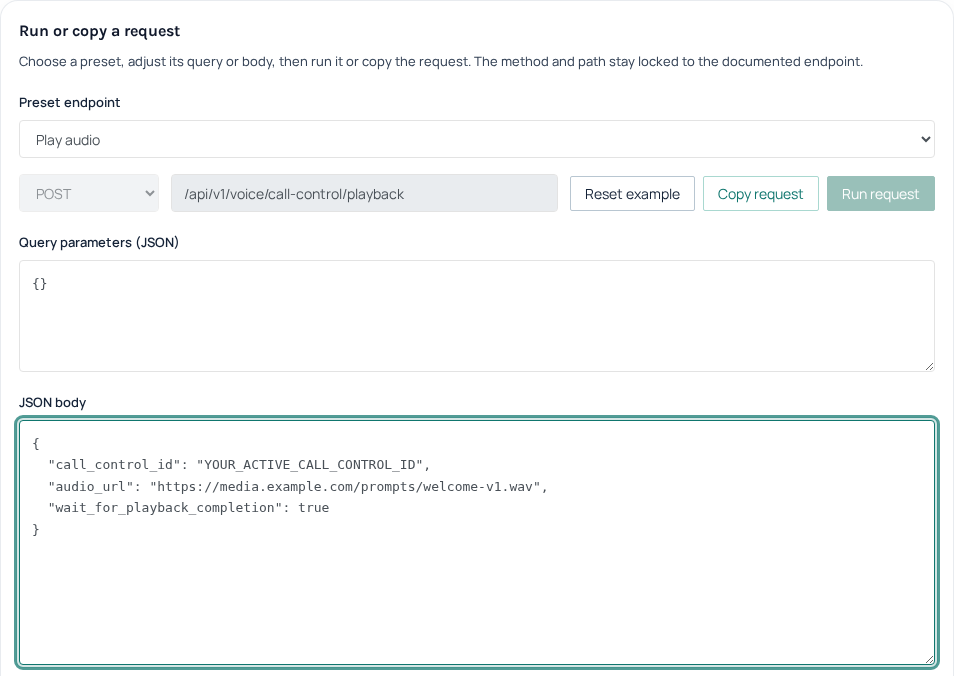
The URL is illustrative. The completion option is supported by the current implementation, although the current OpenAPI playback schema does not yet list it. If your generated client rejects it, reconcile the client contract with this supported option rather than silently removing completion handling. Await the action’s actual result before the next prompt or hangup. Use the documented prompt_audio_url field when the asset belongs to a gather action instead of playing it separately over the caller’s input.
5. Keep call-scoped media separate from library storage
A returned opaque media capability belongs to its authorized call context. Do not reuse it on another call, publish it as a download link or treat it as a filesystem path. Reuse the approved hosted asset for another call through the normal playback request and its own control ID.
Playing an existing file does not make the telephone session free. Review applicable call and service charges separately from the one-time synthesis operation. A successful fetch also does not prove that the caller heard the full prompt.
6. Verify changes and failures
Check a missing file, expired URL, HTML response, malformed audio, interrupted playback and caller disconnect. Keep old approved versions available while active workflows use them. After local file and request checks, arrange an authorized call to assess volume, clipping and clarity on a real telephone. Retain a rollback mapping to the previous approved asset.
Related guides
- Convert text to speech with the IllyVoIP API and save the audio
- Place an outbound notification call with the Voice API
- Build a keypad phone menu with the Voice API
Reference
Current instructions and technical reference: IllyVoIP API documentation.
Reviewed 13 October 2026 against the current IllyVoIP controls, implementation and applicable references. Available options depend on account permissions and service state.