
A SIP 408 means that the responding system could not complete the request within a suitable time. However, a phone may also display a timeout when it receives no final response at all. Start by finding which of those happened; they lead to different investigations.
This guide covers SIP phones and PBXs using IllyVoIP. You need access to the affected device's status or logs and the relevant IllyVoIP SIP line. It does not cover HTTP 408 errors from a website or API.
1. Record the failure before changing anything
Keep the exact error, time and timezone, device model/version, selected line and action that failed. Did the phone fail to register, did an outgoing call time out, or did an incoming call fail to reach the PBX? Note whether it affects every destination, one destination or only calls after a period of inactivity.
If a call report exists in IllyVoIP, save its public reference. Confirm the report's time range and filters before treating an absent row as evidence that the call never arrived. Do not repeatedly redial a destination just to generate more logs.
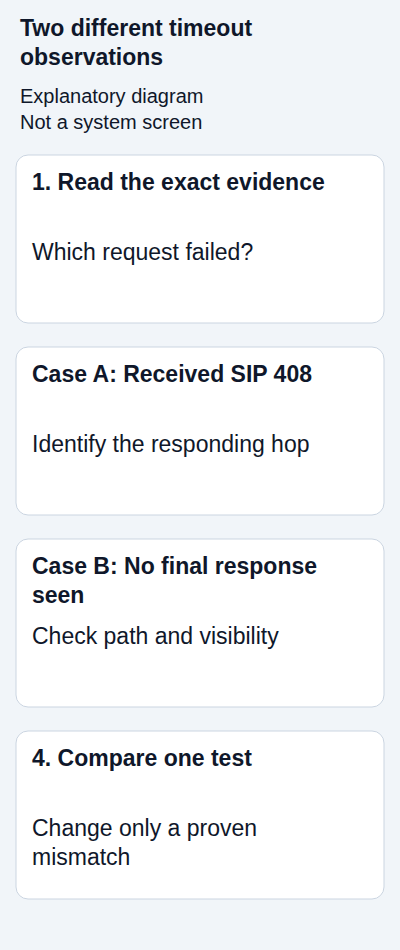
2. Separate a received 408 from a local timeout
Ask the device or PBX administrator to inspect the transaction around the failure. The important distinction is whether a packet or endpoint log contains a received SIP/2.0 408, or whether the application reports that its own wait expired.
- Received 408: identify the observed sender and the request being answered. That system may itself have been waiting for another hop; the response alone does not identify the ultimate fault.
- No final response observed: inspect where the request went and which replies, if any, returned. Capture visibility can be incomplete.
- A vendor-specific status: use that vendor's definition. For example, a PBX's internal error number is not automatically an on-wire SIP status.
Identify the method as well as the code. REGISTER concerns registration, INVITE concerns call setup, and OPTIONS can be a reachability probe. A failed probe does not by itself show what happened to a particular call.
3. Check the correct connection
If a phone registers to FreePBX or 3CX, check that extension connection separately from the trunk to IllyVoIP. A green extension indicator does not prove the trunk is reachable. Likewise, changing the IllyVoIP password cannot fix a phone that is trying to register to the wrong local PBX.
In IllyVoIP, inspect the intended SIP line and its Technical endpoints. Compare the configured hostname, destination port and transport with the device. Do not put the Portal website address into a SIP-server field. For IP authentication, verify the authorized public source address and whether registration is expected at all.
After a WAN failover, VPN change or cloud migration, the actual outgoing source IP may differ from the previous one. Verify it from the relevant network path before editing account authorization.
4. Follow the request through the network
Check DNS resolution from the affected host or its network, not only from your laptop. Confirm that the application uses the expected address and IP family. For TCP/TLS, inspect connection establishment and any certificate or clock errors; a failed TLS handshake may occur before any SIP request is exchanged.
For UDP, look for the request and retransmissions, then replies on the return path. A UDP port scan or successful ping is not proof that the SIP transaction works. If there are two routers performing NAT, inspect both translations with the network administrator.
Review specific firewall drops, source-address restrictions and NAT state against the timestamps. Do not disable the firewall, guess a universal port range or change UDP/TCP/TLS merely to clear the error. If a second trusted network is available and the account configuration permits it, a controlled comparison can help locate the affected path.
5. If registration works, investigate the call transaction
A successful registration does not guarantee every INVITE will succeed. Check the outbound rule, actual selected trunk, transformed destination and permitted caller ID. If only one destination times out, compare a different authorized destination while keeping the line and network unchanged.
Record provisional responses and their times. Ringing followed by a timeout is different evidence from repeated INVITEs with no reply. It still does not prove that the intended person was reached. Keep both the PBX's extension leg and provider leg identifiable in any trace.
If the PBX generates the error without sending an INVITE to IllyVoIP, investigate its local route or upstream connection first. If an observed provider response ends the attempt, send Support the matching call reference and transaction evidence. Do not label either case a provider outage from the number 408 alone.
6. Make one evidence-based correction and retest
Correct the demonstrated mismatch, such as a misspelled endpoint, unintended proxy or specific blocked return path. Record the original value and the change. Avoid increasing SIP timers as the first response: that can make the caller wait longer while leaving the missing response unexplained.
For registration, wait for the device's normal retry and check the final result. For a call, make one short authorized test, confirm the intended destination, two-way audio and the call report. If the change affects a shared trunk, also check incoming calls where they are configured. Normal charges apply.
When to ask for help
Send Support the time and timezone, whether REGISTER or INVITE failed, the final error, affected line, device/PBX version, recent changes and public call reference. Include a small redacted log excerpt only through a private channel. Never include passwords or authorization headers in a public screenshot.
Is 408 always a network problem? No. Network loss is one possibility, but a system can return 408 while waiting for a downstream result. Locate the responding hop and transaction first.
Should I reset the account? Not without evidence of an account configuration problem. A reset can interrupt other devices using the same SIP identity.
Related guides and references
- Fix SIP Registration Failed on an IllyVoIP Phone or PBX
- My SIP phone is registered, but outgoing calls fail
- Diagnose DNS lookup problems for an IllyVoIP SIP server
- Capture a SIP call trace for IllyVoIP Support with Wireshark
- RFC 3261: SIP response semantics
Reviewed 10 October 2026 against current IllyVoIP guidance and the official references above. Version-specific commands and menus need to match your installation. This guide does not claim a completed call test on your PBX or network.