
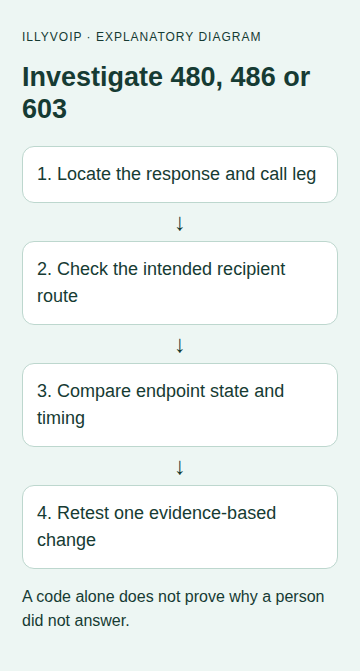
When an IllyVoIP call returns SIP 480, 486 or 603, use the response as the start of a diagnosis. These responses concern different ways a call can be unavailable or refused, but a PBX, application or policy can generate them without a person pressing a button.
This guide helps you compare recipient-side outcomes. It does not replace the existing SIP code reference or establish that a particular destination is currently broken.
1. Capture one representative attempt
Record the time/timezone, calling identity, destination and exact result. Determine whether you are investigating a call to an external number or an incoming call to your IllyVoIP number. Save the public Call Reports reference when available.
Do not repeatedly call an unwilling or unavailable recipient. Use an agreed test destination if a new comparison is needed, and check the applicable rate first.
2. Keep the three outcomes distinct
| Response | What to investigate |
|---|---|
| 480 | Why this recipient was not available for this attempt: receiving endpoint, routing, timing or another reported condition. |
| 486 | Busy handling on the observed destination/leg, including call-waiting and capacity conditions supported by evidence. |
| 603 | A refusal expressed by the receiving side; it does not prove a human manually declined. |
Do not turn these into universal rules such as “480 always means offline” or “486 proves the person is on another call.” Keep the reason text, request direction and responding hop with the code.
3. For incoming IllyVoIP numbers, verify the saved destination
Open the number in the Portal and inspect its actual configured destination. Confirm you are checking the purchased number that was called, not merely a similarly named SIP line. Registration of a phone does not automatically route a number to it.
If it points to a SIP identity or PBX, inspect that receiver's readiness. If it points to a queue, Voice Agent or another available destination type, follow that destination's own routing and schedule controls. Do not change several destinations at once or assume every number/account supports every feature.
Check whether the number or destination has an explicit restriction or account action to complete. Use the displayed process rather than bypassing it. An unrelated setting on a registered phone cannot repair a number routed somewhere else.
4. Inspect the receiving system
- Readiness: verify the intended account/extension is enabled and reachable. For IP-authenticated trunks, absence of REGISTER may be expected.
- Local call handling: inspect DND, forwarding and rejection settings on the actual receiving endpoint. Note whether provisioning controls them.
- Busy behavior: compare an idle receiver with one on a controlled active call. Check supported call waiting and simultaneous-call limits separately.
- PBX routing: inspect the inbound match, destination and any relevant business-hours or application decision.
- Recent changes: compare the affected configuration with its last working state before editing.
Capacity exists at several levels: a phone, PBX, SIP identity and account can each impose limits. Do not claim the account's limit was reached merely because one phone reports Busy.
5. For an external destination, avoid changing your receiving settings
If outgoing calls to other permitted destinations work, preserve that evidence. Compare the exact digits sent after PBX transformations and whether the destination is known to accept the call at that time.
A failed external destination does not justify turning off DND on your own unrelated desk phone or buying another incoming number. Where the recipient can cooperate, ask them to check their receiving system. Otherwise provide Support the specific attempt and observed scope.
6. Read the signaling path when the display is insufficient
Collect a short authorized trace or endpoint log and identify which peer delivered the response. A proxy can relay another system's response. The code identifies an observed outcome, not a complete map of downstream policy.
If several call legs were attempted, compare their final outcomes rather than choosing one code as the explanation for the entire call. Preserve useful differences between a working and failed attempt: identity, destination, time, receiver state and selected route.
7. Confirm the result of one justified correction
After correcting an established problem—such as a wrong saved destination or unintended receiver DND—repeat one controlled check. Verify ringing, answer and two-way audio. Restore an unsuccessful experimental change before proceeding to a different theory.
Send Support the public call reference, time/timezone, direction, exact code/text and a short account of what worked and what did not. Remove secrets and unrelated customer data from evidence.
Common questions
Does603 mean someone blocked my number? It does not establish that. Receiving systems can refuse calls for several reasons; investigate the available evidence.
Will adding more concurrent calls fix 486? Only if a verified capacity limit is the cause. Phone and PBX busy settings can produce a similar user experience.
Should I retry 480 automatically? A retry policy needs the actual application context and recipient permission. Do not create an unbounded paid-call loop from a code alone.
Related guides and official references
- SIP response codes
- My SIP phone is registered, but outgoing calls fail
- Check the destination when your IllyVoIP number does not ring
- Start with the API, Playground and webhooks
Reviewed 9 October 2026 against current IllyVoIP implementation and the linked sources. Use your account’s available options and installed software version. Local example checks do not establish a completed live call, delivered SMS or certified third-party integration.