
When Voice Agent Studio rejects a flow, keep the exact message and inspect the affected connection before rebuilding the agent. Missing node references, incomplete fields and an unreachable branch are different problems. This guide helps you review the visible flow without changing a working incoming route unnecessarily.
1. Preserve the work and identify the message
Stay on the intended agent and note whether the message appeared while editing, submitting an update or following publication progress. Record the agent reference and the visible error. Avoid refreshing away unsaved work or using Reset as a first troubleshooting step. If someone else is editing the same agent, coordinate before applying another version.
2. Follow the path from Start
- Open Call Flow. Use the zoom and Fit controls to locate the Start step and the intended entry path.
- Open Start and inspect its Next destination. Confirm the selected step still exists.
- Follow each reachable step in order. A node merely sitting on the canvas does not make it part of the call path.
- Review branches one at a time, including the paths that are used only for missing input, failure or closed hours.
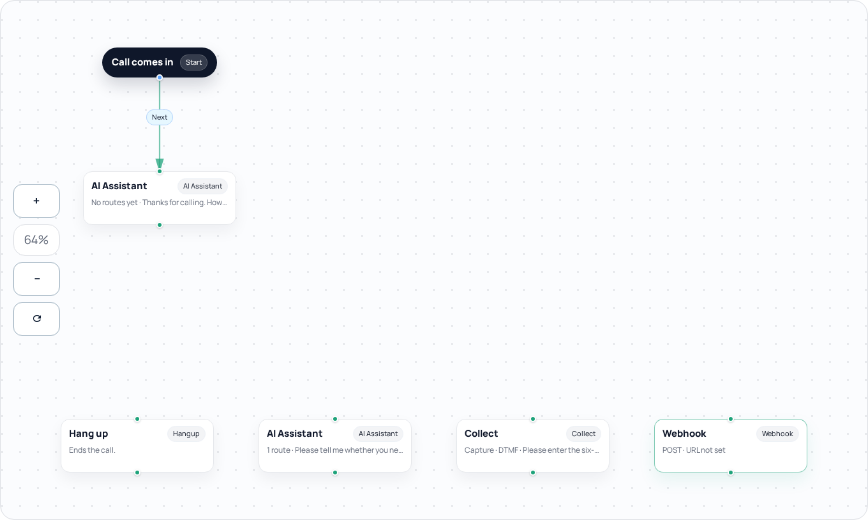
3. Check the destination appropriate to each step
- Start and Play steps: inspect the next-step selection.
- Collect menu: inspect each intended digit route, No input and Invalid digits. Capture mode instead needs its captured-digits or speech path as applicable.
- AI step: inspect every configured route label and destination. An option with no usable destination is incomplete.
- Webhook / HTTP: inspect On success and On failure, as well as the request fields and extraction paths.
- Condition: inspect the true and false destinations and the variable/comparison actually used.
- Transfer and ending behavior: confirm the offered destination is correct and that the remaining path agrees with what callers hear.
4. Correct references without guessing
If a referenced step was deleted, choose an existing replacement in the appropriate destination selector or recreate the needed step through the editor and reconnect it. Do not paste an internal node ID taken from another agent. A duplicate-node-ID error is an identity problem, not a request to rename the visible label only. If normal editor operations cannot resolve it, retain the error and ask Support to inspect the agent rather than manually editing undocumented JSON.
A flow can pass reference validation while still being incomplete for real callers. For example, a blank optional destination may not be reported as a nonexistent node. Review the intended customer outcome, not only whether the red message disappears. Likewise, a valid HTTP URL does not prove the service responds correctly.
5. Apply one reviewed change
- Check the corrected step and all incoming connections that should lead to it.
- Finish the step editor, then use the parent agent’s offered Update or Publish action.
- Wait for the result and follow publication progress. Do not repeatedly submit while it is queued or running.
- Reopen the saved flow and confirm the intended connection remains. Keep the incoming number attached to the appropriate published agent.
6. Verify the affected caller paths
Arrange authorized checks for the corrected path and its nearest fallback. Include silence, an unknown reference or a failed lookup where relevant. Verify the actual handoff and audio separately from configuration acceptance. If the issue remains, give Support the agent reference, exact message, affected step names, time/timezone and a sanitized public call reference. Do not include integration credentials or unrelated customer data.
Related guides
- Prepare an AI voice agent
- Connect Voice Agent flows, integrations and reports
- Build a telephone menu for Sales and Support
Reviewed 12 October 2026 against the current IllyVoIP controls, implementation and applicable references. Available options depend on account permissions and service state.