
Use a Webhook / HTTP step to look up an ordinary service request in your own application during a Voice Agent flow. IllyVoIP sends the configured request and can extract response values into variables. Your application supplies the lookup, permissions and current business result; adding the step does not create a helpdesk connector.
1. Prepare the lookup service
Use an HTTPS endpoint you control with a valid certificate and an allowed public destination. Private, loopback or policy-blocked destinations are not a reason to disable the protection. Ask the integration owner to expose an appropriate authenticated endpoint. Keep responses small and fast, and return only what the conversation needs.
A service reference alone may not authorize disclosure of a customer record. Your backend must decide what this call may learn. For this example, return a generic status for a permitted reference rather than a full name, address or payment history. Use a narrowly scoped integration credential, never the caller’s text as an authorization header.
2. Capture and validate the reference
Collect the reference into service_reference. Confirm its expected format before making the lookup, keeping leading zeroes intact. For a digit-only reference, reject other characters at your backend too. Avoid inserting unrestricted spoken text into a JSON body as though it were already escaped JSON.
3. Configure the HTTP step
- In Call Flow, add a Webhook / HTTP step and connect the valid-reference path to it.
- Choose Method GET or POST to match your endpoint. Use POST for the JSON example below. If Body is not shown after changing the method, select another step and return to this one, then confirm POST is still selected.
- Set the URL to your approved endpoint, for example the HTTPS host
support.example.comwith path/voice/request-status. This is a placeholder, not an IllyVoIP API endpoint. - Set Timeout (seconds) to a short interval your endpoint can meet. The editor’s offered limit is not a promise that every downstream network waits that long.
- For POST, set the request Body and add the required headers under Advanced → Headers. Use
Content-Type: application/jsonfor this example and your backend’s actual authentication scheme.
{"reference":"{{service_reference}}"}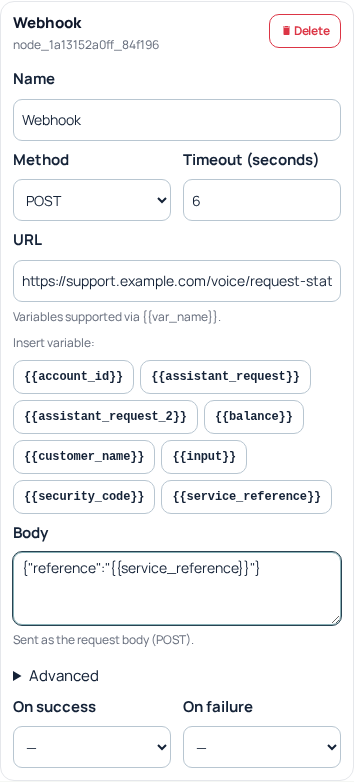
4. Extract only the fields you need
Have your endpoint return a predictable JSON object, for example:
{"found":true,"request":{"status":"Awaiting appointment"}}Under Advanced → Extract JSON fields, map found to a variable such as request_found and request.status to request_status. Use the response’s actual property names and the editor’s path format. A dotted path is not a request to search arbitrary text. Leave “Save raw response body as” empty when the full response is unnecessary.
5. Separate business results from transport success
Connect On success to a Condition that checks the extracted result before speaking it. A successful HTTP response can still say found: false. Route that case to a correction or human-help message. Connect On failure to an honest fallback for timeout, connection or service errors; never announce “not found” merely because the lookup service was unavailable.
Only speak {{request_status}} after confirming a present, valid and authorized result. Treat malformed JSON, a missing field and stale data explicitly. Do not let an old variable value become the answer to a new lookup.
6. Verify before live use
Check the endpoint independently with synthetic references: found, not found, malformed input, unauthorized request, server error and timeout. Then apply the intended agent update and arrange authorized calls through each relevant branch. Source validation or an HTTP200 alone does not prove that callers hear the correct result. Keep credentials and customer JSON out of screenshots and Support examples. If a call fails, provide the public call reference, approximate request time and sanitized error context.
Related guides
Reviewed 12 October 2026 against the current IllyVoIP controls, implementation and applicable references. Available options depend on account permissions and service state.