
Start with the correct number
Open Phone Numbers, find your number and select Configure. Check the number at the top of the dialog. Expand the optional service you need. Availability depends on the number, country and account; a service shown for one number is not necessarily available for another.
If the configuration cannot load, use its retry control or reopen it. Do not interpret a loading error as confirmation that a service is disabled. Keep your incoming destination unchanged unless you intend to change how calls are received.
Set or remove an outgoing caller name
Outgoing caller name (CNAM) is available on eligible US numbers. It is separate from choosing or verifying the telephone number used as Caller ID. A +1 prefix alone does not mean a number is eligible.
- Expand Outgoing caller name and review the current name and any pending request.
- Select set/update or remove. For a name, follow the form’s character rules and 15-character limit. Choose Business/Residential and display options only if the form offers them.
- Select Review update, check the quoted update fee and confirm only if the details are correct. Do not assume removing a name is free; review its quote too.
- Follow the request status. Pending or processing means the change is not yet confirmed. If asked for more information, respond through the linked request or Support.
A confirmed name does not guarantee display on every receiving phone: the receiving network determines what it shows. If a request times out, check its status before submitting again to avoid requesting the same paid change twice.
Register or change an emergency address
Address registration does not by itself enable emergency calling. Confirm service availability and emergency-call routing with Support. Never call an emergency number as a routine test.
- Expand Emergency address registration, where available.
- Select registration, change of address or deactivation as offered. Complete the country-specific contact and address fields accurately.
- Submit the request and follow its status. A pending request is not a confirmed address.
- Reply to requests for corrections through the secure account workflow. After approval, verify the recorded details and separately confirm calling availability.
If the option is absent, do not assume emergency calls are supported through the number. Use another established way to reach emergency services until availability is confirmed.
Configure fax delivery
Where Fax is offered, review its current state, enter the correct fax-delivery email and save. Enabling fax requires a valid email address and makes the number fax-only: incoming voice calls will not work while fax is enabled. Enable it only if that is the intended use of the number. Check the saved state and test with an ordinary fax before relying on it.
If the screen says Support review is required or the save result is unclear, contact Support with the number, requested change and time. Do not repeatedly toggle the service or post private documents publicly.
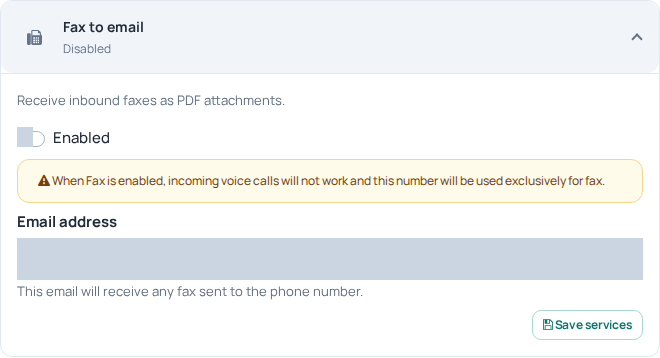
Fax to email has its own enable control and delivery address. The Portal explicitly warns that enabling fax stops incoming voice calls on that number. Private fields are hidden; no service was changed. Availability depends on the selected number. Open the image for a larger view.