
Start with your account
Open the Dashboard and check that you are signed into the intended account. Review any verification, agreement or service-readiness notice before using a paid service. A balance or activity summary is not an invoice; billing records have their own pages.
An account owner and an employee can see different menus. Your access depends on your role, assigned permissions and enabled services. A missing control does not automatically mean the platform is broken. Ask your account owner about employee access before opening another account.
Use the Getting started checklist
Eligible new account owners see a Getting started card on the Dashboard during the account's first 30 days. It provides six task links, with a completion counter for the first five. It is a guide to account preparation, not a certification that calls will work.
- Verify your email or phone: review your sign-in identity and complete the verification requested in account settings.
- Protect your account with 2FA: open Security and configure a supported second factor.
- Verify your identity: open verification and follow the current requirements. If it is under review, check the existing request rather than repeatedly starting again. Identity verification is required before ordering a phone number.
- Add funds to your balance: review payment methods if your account is prepaid. A postpaid account instead shows Review your billing; that checklist state is not proof that a particular invoice is settled.
- Choose a business phone number: browse numbers when you need incoming service. Having a number does not prove its incoming destination is configured correctly.
- Set up calling: open the calling options and choose your app or SIP configuration. This link does not add a sixth automatically completed step.
Read checklist states without guessing
Complete means the corresponding account check is satisfied. Open takes you to the task. Check status means the card could not determine that state; open the relevant page instead of treating it as a failure or as completion.
Select Show or hide steps to collapse or expand the card. This display preference is kept in the browser; hiding the steps does not finish them. Older accounts and employees may not see this new-owner card. The ordinary service pages remain the place to perform the tasks your account supports.
After working through the checklist, verify your actual use case: correct SIP credentials or webphone access, eligible caller ID, the intended number destination and an authorized calling check. The five-step counter does not test external devices, live audio or delivery.
Choose the task
- Make calls: use the webphone or connect an app, SIP phone or PBX using your SIP line's connection details.
- Receive calls: open Phone Numbers, check that your number is active and configure its destination. Creating a SIP line alone does not route every number to it.
- Send messages: open SMS, choose an eligible sender and review the recipients and price before confirming.
- Work with a team: use Agents, Contacts, Agent Workspace, queues and campaigns as permitted.
- Review activity: use live operations for current calls, call history for completed calls and the ledger for balance movements.
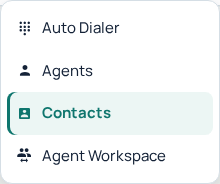
The Contact Center menu groups contacts, agents, the dialer and Agent Workspace. Available menus depend on your account role and enabled services. Open the image for a larger view.
Manage settings deliberately
Account settings contain profile, security, routing, preferences and integrations. Use the dedicated verification controls to change a login email or phone. Review the displayed effect before changing a package, SIP authentication mode or live number destination.
Find help without exposing private data
Use a guide for the task you are performing, then contact Support if its checks do not resolve the problem. Include the page, time, visible error and public record reference. Never share a password, verification code or API key.
Continue with account readiness, SIP lines and agents or transactions and invoices.
Reviewed 10 October 2026 against the current IllyVoIP Portal and service implementation. Available controls depend on account access and service state.