
To send an SMS to Kosovo, use an authorized recipient’s complete +383 number with the IllyVoIP SMS API. Check destination availability, your permitted sender and the message’s encoding before submitting it. Keep the returned message ID so you can follow delivery separately from submission.
This guide is for developers sending a requested notification from a backend. It does not promise support for every Kosovo network or every type of message. Current destination records are not a substitute for the options and result returned for your own account.
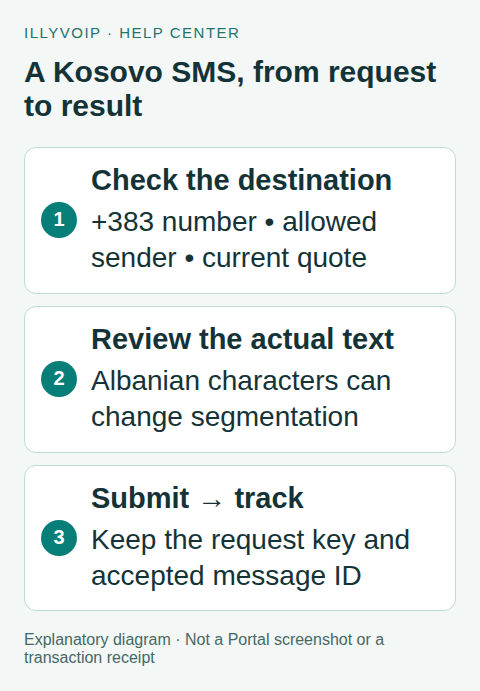
1. Prepare the account and destination
Enable the API access available to your account and obtain your key through the Portal’s verification process. Use an approved sender available to that account, sufficient balance and a recipient who expects this message. An approved sender does not automatically approve every messaging use case.
Ask the recipient for their number in international format. Store it as text, including the plus sign. Do not prepend +383 to a number that already includes a country code, or leave a domestic trunk prefix after the country code. If you cannot confidently interpret a local-format number, confirm it with the recipient rather than guessing.
IllyVoIP number analysis can help check formatting and available metadata. Neither a valid format nor a carrier name proves ownership, SMS capability or delivery. Do not infer the current network solely from the number’s prefix.
2. Review the actual message and price
In the Portal’s SMS composer, enter the same destination, allowed sender and text to inspect the review information without confirming a send. Check the destination quote, encoding and segment count. If no supported quote is available or the account requires a review, stop and resolve that condition first. This preview is not a price reservation for a later API submission.
Keep Albanian spelling intact. Characters such as ë and ç can move a message outside the GSM-7 alphabet. Unicode SMS commonly has a smaller per-segment allowance; a short-looking message may cost more than one segment. Emoji can consume multiple encoding units. Use the composer’s calculation and the API’s returned encoding/segment fields rather than counting visible letters.
A useful notification is brief and specific, for example: “Përshëndetje! Takimi juaj është konfirmuar. Për ndryshime, na kontaktoni.” This is example wording, not an approved campaign template. Include only the information the recipient needs; avoid sensitive appointment details.
3. Prepare one request before sending
The following terminal template needs Python 3, jq and cURL. Set the three environment variables privately. SMS_TO must contain a real authorized +383 recipient; no example phone number is supplied for you to accidentally contact. Save one stable key and the exact request before running the POST.
umask 077
: "${ILLYVOIP_API_KEY:?Set your API key}"
: "${SMS_TO:?Set the authorized +383 recipient}"
: "${SMS_FROM:?Set your allowed sender}"
python3 -c 'import uuid; print(uuid.uuid4())' > kosovo-key.txt
jq -n --arg to "$SMS_TO" --arg sender "$SMS_FROM"   '{from:$sender,to:[$to],message:"Përshëndetje! Takimi juaj është konfirmuar."}'   > kosovo-request.json
# Review both files before executing the paid request below.
curl --silent --show-error --fail-with-body   'https://api.illyvoip.com/api/v1/sms/messages'   -H "X-Api-Key: $ILLYVOIP_API_KEY"   -H "Idempotency-Key: $(cat kosovo-key.txt)"   -H 'Content-Type: application/json'   --data-binary @kosovo-request.json > kosovo-response.json
The POST can send a real billable SMS. Do not run the whole block again to retry an uncertain outcome: it would generate a new key. Keep the saved key and request unchanged while reconciling that submission.
4. Read acceptance, then delivery
Check the HTTP outcome and JSON status. For this one-recipient request, inspect queued_count, queued_message_ids, invalid_numbers, encoding, segments_per_recipient and total_cost. A rejected recipient has no accepted message ID to follow. Do not display “delivered” just because the submission succeeded.
For an accepted message, call GET /api/v1/sms/messages/status with the returned ID in the message_id query parameter and the same API authentication. Alternatively, receive verified delivery webhooks. Store the delivery result and billing/refund information separately. Delivered is not a read receipt.
5. Investigate an unsuccessful result
- Invalid number: confirm the complete international number; do not try random prefixes.
- Sender or use-case review: complete the account’s requested process. Approval does not automatically resend a stopped message.
- Encoding rejection: review the destination response and agree any wording change. Do not silently remove Albanian characters.
- Queued or unknown after a timeout: reconcile the existing submission before sending a replacement.
- Failed delivery: retain the message ID, time/timezone and safe error details for Support. Do not include the API key.
Frequently asked questions
Can I receive a reply to an alphanumeric sender?
Do not assume so. An alphanumeric sender is not a reply-capable phone number. Two-way messaging requires a separately supported number and receiving setup.
Does this prove OTP delivery in Kosovo?
No. An API example and destination listing do not establish suitability or delivery performance for verification codes. Confirm your use case and measure authorized real traffic separately.
Related guides and official references
- API access and Playground
- Webhook delivery and verification
- IllyVoIP developer resources
- Review SMS in the Portal
- SMS delivery troubleshooting
Reviewed on 8 October 2026 against the current IllyVoIP implementation and available official documentation. Examples use placeholders and are not evidence of a completed live transaction. Check your account’s current availability and prices before executing paid requests.