
A Collect input step can store keypad digits or spoken information for later steps in a Voice Agent flow. This guide uses an ordinary service reference. It does not turn a reference number, caller ID or a spoken answer into identity verification.
1. Define the reference you need
Choose a short, non-sensitive reference that your service can check, such as a six-digit service request number. Do not collect passwords, payment-card information or one-time security codes for this example. Decide what counts as a valid reference, whether leading zeroes matter and where a caller can get help if they do not have it.
2. Set up the Collect input step
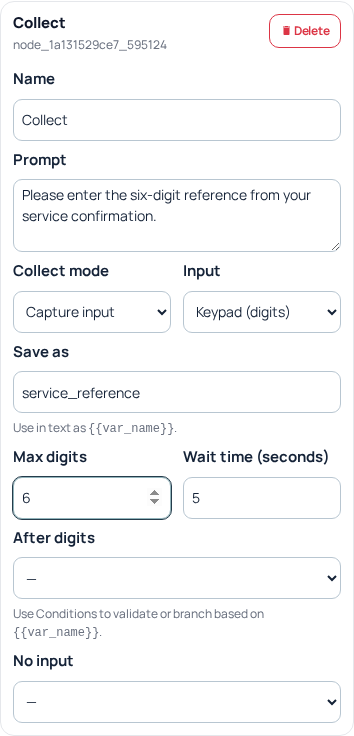
- Open the agent’s Call Flow, add a Collect input step and give it a clear name such as “Service reference.”
- Write a concise Prompt: “Please enter the six-digit reference from your service confirmation.” Explain the expected input without promising that every entry exists.
- Choose Input: Keypad (digits), Speech, or Keypad or speech. For a digit sequence rather than a one-key menu, select Collect mode → Capture input when that control is offered.
- Set Save as to
service_reference. Reuse the exact variable name in later steps and keep it distinct from a raw transcript variable. - For keypad input, choose Max digits within 1–20 and set the offered Wait time (seconds) within 1–30. Max digits is a collection limit, not proof that the input meets your business rules.
3. Decide whether to ask again
Speech capture can show Previously supplied answer. Keep Always ask again when you need a fresh explicit response. The option to reuse a relevant recent answer can reduce repetition for an ordinary reference, but it should not substitute for a required confirmation. The separate recent-international-number option is for that kind of number, not arbitrary reference text.
4. Connect successful and missing-input paths
For captured keypad input, connect After digits to the next validation or lookup step. Connect the offered speech path when speech is enabled, and configure No input for silence or timeout. Menu digit routes and “Invalid digits” apply to the menu mode; do not rely on them to validate a captured six-digit reference.
Use a Condition where its offered comparisons are sufficient, or validate the reference in your own lookup endpoint. Keep leading zeroes as text. A reference such as 004281 must not silently become 4281. Separate invalid format from a correctly formatted reference that is not found.
5. Use the value deliberately
Later text or supported request fields can reference {{service_reference}}. For example, a short confirmation may repeat the entered reference before the lookup. Read back only information appropriate for the caller to hear. Never interpolate untrusted speech into a privileged command or use it to choose an arbitrary external host.
Offer a bounded correction path or a human handoff. A loop that asks forever is not a recovery plan. If the caller changes the reference, ensure the lookup uses the current value rather than a result from a previous attempt.
6. Apply and test the complete path
Finish editing the step, apply the parent agent update and verify the saved state. With authorized calls, check a valid reference, a leading-zero reference, too-short input, silence, a correction and an unknown reference. Confirm that the lookup or handoff actually uses the intended value. A visually connected node is not proof of successful recognition or a working external service. For failures, retain the agent reference, visible validation message and sanitized call reference.
Related guides
- Prepare an AI voice agent
- Connect Voice Agent flows, integrations and reports
- Build a telephone menu for Sales and Support
Reviewed 12 October 2026 against the current IllyVoIP controls, implementation and applicable references. Available options depend on account permissions and service state.