
Use Speaking style and Speaking guidance (optional) to shape how an IllyVoIP Voice Agent expresses its answers. Use Knowledge for business facts and Call Flow for actions such as transfers. A tone instruction does not configure a service or make an unsupported promise true.
1. Open the agent’s Basics controls
- Open Voice Agent Studio and select the intended agent.
- Open Basics and check the main language and selected voice.
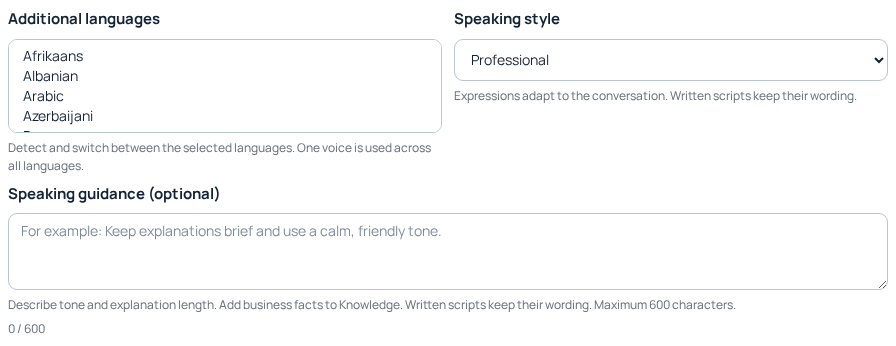
- Find Speaking style. The offered presets are Professional, Warm, Serious, Reassuring, Cheerful and Calm.
- Choose the style that suits the conversations this agent handles.
For example, a service desk may need brief, calm explanations, while a reception assistant may use a warmer introduction. Choose for the task rather than expecting a preset to guarantee a particular emotion in every sentence. One voice is used across the selected languages; style does not clone a voice.
2. Add short, useful speaking guidance
The optional guidance allows up to 600 characters. Describe tone and explanation length, with one clear priority when instructions could conflict. The screen’s counter and validation are the authority for whether the text fits.
A practical example is: “Use a calm, friendly tone. Answer the question directly in one or two short sentences, then offer more detail if needed. When something is uncertain, say so clearly.” Adapt this to your actual service rather than copying several competing styles into the same box.
- Write one concise draft in Speaking guidance.
- Remove repeated instructions and vague demands such as always be perfect.
- Check that the wording does not promise a refund, booking, transfer or result the configured agent cannot provide.
- Read the counter and correct any validation error before applying the change.
3. Keep facts and actions out of the tone field
- Opening hours, prices and eligibility belong in reviewed Knowledge entries.
- The actual destination for a human handoff belongs in Call Flow.
- A greeting or fixed script needs its own wording reviewed directly.
- An external lookup requires a configured, authorized integration and a failure path.
The editor explicitly preserves written script wording. Changing style is not a request to translate or rewrite every saved greeting. If a script sounds too long or uses the wrong language, edit that script deliberately and check its pronunciation and meaning afterward.
4. Apply the change and verify its saved state
- Review the selected agent and the complete pending changes.
- Use Update or Publish as offered for the intended change.
- Wait for the result and inspect any publishing or audio-preparation status.
- Reopen the same agent and confirm the saved style and guidance before evaluating a customer-facing conversation.
If another administrator has changed the agent, read the latest version and compare your edit before submitting again. Do not add a second Knowledge entry merely because the first test sounded different; first check whether the style change was actually applied.
5. Compare a small set of realistic questions
During an authorized test, ask a straightforward question, a question needing explanation, an unknown question and a request for a person. Check whether answers are clear and appropriately brief, facts remain accurate and the real handoff path works. Calls and generated speech can incur charges. A pleasant voice sample alone does not test these conversation behaviors.
Change one wording choice at a time and keep the previous guidance privately so you can restore it deliberately. If the agent states a wrong fact, correct the factual source or conflicting knowledge rather than trying to hide the problem with a friendlier tone. For persistent issues, give Support the agent reference, relevant call reference and a short sanitized example.
Related guides
- Prepare an AI voice agent
- Build and maintain your Voice Agent knowledge
- Connect Voice Agent flows, integrations and reports
- Read a Voice Agent call report and its usage charge
Reviewed 12 October 2026 against the current IllyVoIP controls, implementation and applicable references. Available options depend on account permissions and service state.